
As an Amazon Associate, 456 AutoFix earns from qualifying purchases. Product links below go to Amazon, where you can confirm the right part for your vehicle.
A generic code reader finds a Ford’s engine fault, then goes quiet about the ABS light or the airbag warning. The best scan tool for Ford owners is one that talks to the modules Ford builds into its trucks and cars, and that can run the Ford service routines a modern F-150, Escape or Explorer expects after common repairs.
You can get there with a Ford-specific handheld or a laptop running FORScan. This guide explains both, then reviews six tools. For a broader look at scanners across every make, see our OBD2 scanner guide for DIY mechanics.
Quick answer
Which scan tool makes the most sense for a Ford?
If you want a screen in your hand, the Foxwell NT530 for Ford lists all-system diagnostics, active tests and Ford service resets. If you own a Windows laptop, the OBDLink EX running FORScan is listed for all Ford modules. The Ancel FD500 covers codes and battery registration on a tighter budget.
Our Quick Picks
Three tools that cover the main ways Ford owners diagnose at home:

Foxwell NT530 for Ford
Ford software built in, from ABS bleeding to crank sensor relearn.
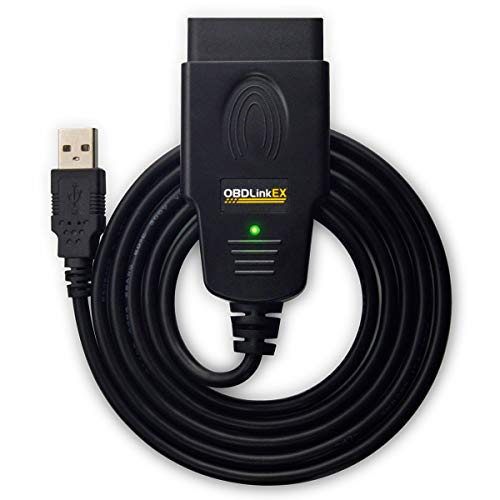
OBDLink EX
Pairs with FORScan to reach modules a regular reader cannot.

Ancel FD500
Covers the common Ford resets without the extra menus.
Handheld Scanner or FORScan: Two Routes Into a Ford
Any reader can pull a generic engine code from a 1996 or newer Ford. The trouble is that Ford spreads its body and chassis modules across more than one network, and a basic reader never sees most of them.
A Ford-specific handheld solves that with brand software already loaded: plug it in and the menus lead you to ABS bleeding, battery registration or a parking brake service mode.
FORScan is the other route. According to the FORScan project’s own home page, it is a software scanner designed for Ford, Mazda, Lincoln and Mercury vehicles that can see modules regular OBD2 scanners miss and run service procedures. The Windows version adds configuration and programming, which requires its Extended License.
The same page lists Ford, Lincoln and Mercury support from 1996 through the 2024 model year, with 2025 and newer models on a best-effort basis, and names recommended adapters, including two reviewed below.
What to Check Before You Buy a Ford Scanner
Ford tools look alike on a product page, so compare them on these points.
- Module coverage: look for ABS, airbag (SRS), transmission and body modules named in the listing, not just “OBD2 functions”.
- Ford service routines: battery registration, PCM KAM reset, EPB service mode and steering angle calibration are the jobs owners need most often.
- Model year range: some listings stop at a set year, so match the range to your truck or car before ordering.
- Diesel functions: Power Stroke owners should look for DPF regeneration and injector coding in the listing itself.
Best Scan Tool for Ford: Six Tools Reviewed
Four are handhelds with Ford software built in, and two are USB adapters for running FORScan on a laptop. Features come from each Amazon listing.
1. Foxwell NT530 for Ford: All-System Bidirectional Scanner with Service Resets
- All-system diagnostics for Ford brands
- Bidirectional active tests and coding
- Oil, EPB, throttle, battery and DPF services
- Full OBD2 modes, no subscription fee
The Foxwell NT530 for Ford is a handheld scan tool loaded with Ford brand software, so it reaches far more than the engine computer. The listing names ABS, SRS, steering angle, transmission, power steering, TPMS, parking brake, HVAC, keyless entry and lane keeping systems among the modules it can diagnose. That coverage matters on a modern Ford, where a warning light on the dash often comes from a module a generic reader cannot see.
Beyond reading and clearing codes, the tool lists bidirectional operation and active tests, which let you command a part on and off to see whether it responds. Service functions in the listing include oil reminder resets, parking brake retraction for pad changes, throttle position resets, DPF regeneration, battery replacement, crankshaft position sensor relearn and module coding. A history feature stores the VIN and past sessions, so you do not have to enter vehicle details each time.
Foxwell lists full OBD2 ten-mode functions without a subscription, and those generic modes also work on other brands, so a household with a second, non-Ford car still gets engine code reading. The trade-off is that the Ford menus are the main reason to buy it. If you only ever need generic engine codes, a basic reader costs less and does that job.
View Foxwell NT530 for Ford on Amazon
2. OBDLink EX: USB FORScan Adapter with Automatic Multi-CAN Switching
- Designed for FORScan, recommended by its team
- Supports all Ford protocols and modules
- Electronic switch reaches every CAN bus
- Listed up to 20 times faster than toggle adapters
The OBDLink EX is not a scanner on its own. It is a USB adapter that connects a Windows laptop to the Ford diagnostic port, and its listing says it was custom designed for FORScan and is recommended by the FORScan team. The FORScan home page backs that up, naming the EX as a recommended USB adapter for the Windows version, including configuration and programming functions.
Many Fords split their modules between a high-speed and a medium-speed CAN network, and cheaper adapters use a physical toggle switch to move between them. The EX uses an electronic switch instead, which the listing says lets FORScan reach all CAN buses at the same time and enables advanced functions that toggle adapters cannot. OBDLink also lists throughput up to 20 times faster than toggle-switch adapters and a stable connection that avoids dropped data packets.
Because the software does the diagnosing, what you can do depends on what FORScan supports for your model and which license you run. You will need a Windows laptop near the truck, and configuration changes call for care and a healthy battery. If you want a self-contained tool to leave in the glovebox, a handheld fits that habit better than a cable and a laptop.

3. Ancel FD700: Ford, Lincoln and Mercury Scanner with 33 Special Functions

- Full-system scan for Ford, Lincoln, Mercury
- 33 functions incl. BMS, EPB, IQA, DPF
- Generic OBD2 on other 1996+ brands
- 2.8 inch color screen, battery voltage view
The Ancel FD700 is a handheld built for the Ford group, and its listing names Ford, Lincoln and Mercury coverage across engine, SRS, TPMS, ABS, steering angle, stability control, transmission, crankshaft position, parking brake, power steering and battery management modules. It reads and clears codes in those systems and shows live data, so you can watch sensor values while the engine runs.
Its standout is the list of 33 special functions. Among them are battery registration, parking brake maintenance mode, ABS service bleed, PCM KAM reset, DPF regeneration, injector quantity adjustment (IQA), steering angle calibration, transmission learning and clearing transmission adaptive tables, plus oil and tire pressure resets. The diesel items make it worth a look for Power Stroke owners, as long as the listing covers their model year. A BAT screen shows live battery voltage.
Generic OBD2 functions work on other brands from 1996 on, including code lookup, readiness, EVAP testing and vehicle information. The listing gives Ford group compatibility from 1996 to 2019 and names models from the F-150 and Super Duty to the Transit, Escape and Lincoln MKZ. Owners of newer Fords should confirm coverage on the listing first, and updates install through a Windows PC.
4. iCarsoft FD V1.0: All-System Ford Scanner with CAN-FD and Oil and SAS Resets

- Designed around Ford and Holden systems
- Reads codes and live data in all systems
- Oil service and steering angle resets
- Battery test, 2.8 inch screen, PC updates
The iCarsoft FD V1.0 is a handheld that iCarsoft says is designed around Ford and Holden systems, covering US, European and Australian Fords. Its title also names Chrysler, Dodge, Jeep and GM, but the Ford focus is the reason it appears here. The listing describes all-system diagnostics, meaning it reads and clears trouble codes and shows live data from modules such as ABS, SRS, transmission and engine.
Support for the CAN-FD protocol is a useful detail, since it is the faster network type used on some recent vehicles. Service functions are lighter than on the Foxwell or Ancel tools: the listing names an oil reset and a steering angle sensor reset, and it adds a battery test that reports whether the battery and charging voltage look healthy. Its 2.8 inch screen and button navigation are aimed at owners new to scan tools.
Software and vehicle updates are listed as free for life with no subscription, installed through a PC rather than over Wi-Fi. The menus support English, German, French, Dutch, Spanish and Italian. If your main jobs are battery registration or parking brake service, look at a tool whose listing names those functions, because this one centers on reading codes and data.
View iCarsoft FD V1.0 on Amazon
5. Ancel FD500: Ford Scanner with Battery Registration and EPB Service Mode
- Codes from engine, ABS, SRS, 4WD, HVAC
- Battery registration after a new battery
- EPB maintenance, throttle (KAM) and oil resets
- Generic OBD2 on any 16-pin vehicle
The Ancel FD500 is a smaller, simpler Ford group handheld that keeps the functions owners reach for most. Its listing covers 1996 and newer Ford, Lincoln and Mercury vehicles and says it reads and clears trouble codes from the engine, ABS, SRS, transmission, HVAC and 4WD systems, among others. That is enough to see why a stability or airbag light has come on, not just a check engine light.
Four Ford service jobs are named in the listing: throttle (KAM) reset, oil reset, electronic parking brake maintenance mode and battery registration. The battery item is the one many owners need after a winter battery swap, and the listing walks through doing it with the ignition on and the engine off. EPB mode matters if you plan to change rear pads on a Ford with an electronic parking brake.
Generic OBD2 functions work on any vehicle with a 16-pin port, including readiness checks, live data and battery voltage. The 2.4 inch color screen is smaller than the FD700’s, and Ancel lists a one-year warranty with free updates. It lacks the diesel and transmission learning functions of its bigger sibling, so Power Stroke owners should compare the two.
6. Vgate vLinker FS: USB OBD2 Adapter Optimized for FORScan with HS/MS-CAN Auto Switch

- Optimized for FORScan on a Windows PC
- Auto switching for HS-CAN and MS-CAN
- Works on 12V and 24V gas or diesel
- About 18V output for select ECU programming
The Vgate vLinker FS is a USB adapter that, like the OBDLink EX, turns a Windows laptop into a Ford scan tool once FORScan is installed. Vgate lists it as optimized for FORScan, and the FORScan home page names the vLinker FS USB as a recommended adapter for its Windows version, including configuration and programming functions. Diagnostic software is not included, so plan on downloading it separately.
The adapter automatically finds and connects to supported CAN networks, including the HS-CAN and MS-CAN buses that Ford uses, so there is no toggle switch to flip. The listing also claims data transfer up to 3 Mbps with full-size packets for complete code retrieval and steady live data. It works with other ELM327-based apps, including AlfaOBD and VCTool, if you own more than one brand.
Vgate lists support for 12V and 24V gasoline and diesel vehicles with a standard OBD2 port, and an output of around 18V for ECU programming on select older US vehicles. That last feature is for experienced users, and the listing itself advises checking service documentation first. Like any adapter, it needs a laptop on hand, so owners who want a screen in the hand will prefer a handheld.
View Vgate vLinker FS on Amazon
How the Six Ford Tools Compare
Handhelds suit owners who want to plug in and read a menu, while the adapters suit laptop users after the deepest Ford access.
| Tool | Type | Ford extras listed | Good fit for |
|---|---|---|---|
| Foxwell NT530 for Ford | Handheld | All systems, active tests, coding, DPF regen | Owners who want one tool for most Ford jobs |
| OBDLink EX | USB adapter for FORScan | Whatever FORScan supports, all CAN buses at once | Laptop users after the deepest module access |
| Ancel FD700 | Handheld | 33 special functions, IQA, transmission learning | Diesel and older Ford owners up to 2019 |
| iCarsoft FD V1.0 | Handheld | All-system codes, oil and SAS resets | Reading codes and live data across modules |
| Ancel FD500 | Handheld | Battery registration, EPB, KAM and oil resets | Budget Ford owners after a battery swap |
| Vgate vLinker FS | USB adapter for FORScan | Auto HS/MS-CAN switching, 12V and 24V | FORScan users who want a second adapter option |
Ford Service Jobs That Need More Than a Code Reader
Battery replacement is the big one in West Michigan, where sub-zero mornings finish off tired batteries every winter. Many newer Fords use a battery monitoring system that should be told a new battery is in, or the charging strategy may keep treating it like the old one.

Rear brake work on a Ford with an electronic parking brake needs a service mode to retract the calipers before new pads go in. A battery swap or throttle body cleaning may also call for a PCM KAM reset so the engine relearns idle.
Programming modules on a weak battery can turn a small job into a big one, so connect a charger first; our guide to the battery charger for Ford vehicles covers that side.
When a Ford Code Belongs in the Shop
A scanner reports what a module has noticed, not which part failed. A lean code can come from a vacuum leak, a dirty airflow sensor or a weak fuel pump. If the light is steady and the truck drives normally, our article on a check engine light that stays on while the car runs fine explains what usually sits behind it.
Brand-specific codes point to a system rather than a single part, as our list of common Audi fault codes shows. A flashing check engine light, a brake warning or an airbag light means stop guessing and have it checked.

When the code returns after a repair, or you would rather someone test the parts behind it, our check engine light diagnostic service in Grand Rapids works on foreign and domestic vehicles, Fords included.
More Buying Guides
Frequently Asked Questions
Is FORScan free to use?
The basic version reads and clears codes in all modules and runs tests and service procedures. Configuration and programming in the Windows version need FORScan’s Extended License. You also need a compatible adapter, such as the OBDLink EX or vLinker FS, since the software does not include one.
Do I need to register a new battery on my Ford?
Many newer Fords with a battery monitoring system expect it, so the charging system learns the new battery. Your owner’s manual or a parts catalog will say whether your model has the system. The Foxwell NT530, Ancel FD700 and Ancel FD500 listings all include battery registration.
Will a Ford scanner work on my other cars?
For engine codes, usually yes. The handhelds here list standard OBD2 functions on other 1996 and newer makes, though the Ford-only menus stay Ford-only. FORScan is different: its makers say it does not support vehicles other than Ford, Mazda, Lincoln and Mercury.
What is the best scan tool for Ford trucks with a diesel?
Look for diesel functions named in the listing. The Ancel FD700 lists DPF regeneration and injector coding (IQA), and the Foxwell NT530 for Ford lists DPF regeneration. Check the model year range first, since the FD700 listing covers Ford vehicles from 1996 to 2019.
Pulled a Ford code and not sure where to go from there? Call 456 AutoFix at 616-279-3832, Monday to Friday 8am to 5pm, or arrange a diagnostic appointment on our contact page.
Working late that week? Drop your keys after hours at our Creston shop on Carrier St NE, number 456, and jot the code on a note for us.