
As an Amazon Associate, 456 AutoFix earns from qualifying purchases. Product links below go to Amazon, where you can confirm the right part for your vehicle.
Shopping for a camera to record your drives usually ends at a fork in the road. One path leads to a small unit tucked behind the windshield, the other to a wide screen that clips over your rearview mirror. Both save footage of a crash, so the dash cam vs mirror cam choice comes down to how you drive, what you can see out the back, and how much wiring you are willing to do.
This guide explains how each format works, where each one falls short, and what powering them means for your battery during a Michigan winter. After that we look at one windshield camera, one mirror camera and the hardwire kit that unlocks parking mode on the mirror unit. If you only want a ranked list of windshield models, our best dash cam buying guide covers six of them.
Quick answer
Should I get a dash cam or a mirror cam?
Get a windshield dash cam if you care most about sharp video, a discreet fit and a simple install. Choose a mirror cam if your rear view is blocked by cargo, passengers or a small back window, since its screen shows the rear camera feed. Both need a hardwire kit with a voltage cutoff for parking mode.
Our Quick Picks
For the dash cam vs mirror cam decision, here is a 4K windshield camera and a 4K mirror camera side by side, plus a related third pick, the hardwire kit that adds parking mode to the mirror unit.
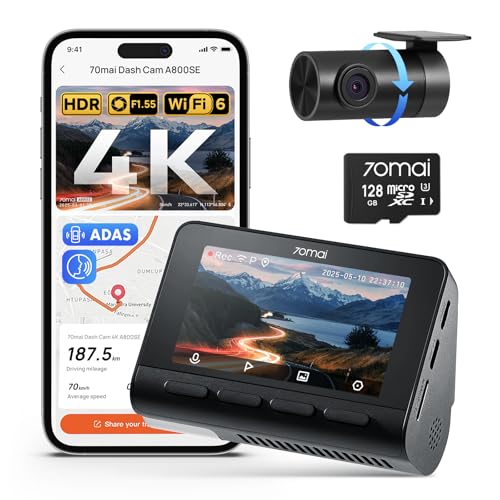
70mai 4K A800SE
A compact two-channel recorder that leaves your mirror untouched.

WOLFBOX G900 PRO
A recorder and live digital rear view in one mirror-mounted unit.

WOLFBOX 4A Hardwire Kit
The power kit that turns on parking mode without draining the battery.
Two Ways to Put a Camera Behind the Glass
A windshield dash cam is a compact recorder that sticks to the glass with an adhesive or suction mount, usually behind the rearview mirror where it stays out of your sightline. Many have a small screen for setup, and many connect to a phone app over Wi-Fi so you can pull clips without removing the memory card. A rear camera is optional on some models and included on others, so read the box contents carefully.
A mirror cam, also sold as a mirror dash cam or streaming media mirror, is a long touchscreen that straps over your existing mirror or mounts on a bracket. The front lens sits on the back of the unit and looks through the windshield. A rear camera on a long cable mounts on the back glass or near the license plate, and its live feed fills the screen while you drive.
So the two products overlap on recording but differ on purpose. The windshield unit is a quiet witness that you mostly forget about. The mirror unit is a recorder and a digital rear view rolled into one, which changes how you use your mirror every day.
Mirror Dash Cam vs Regular Dash Cam: Where Each Wins
Reviews and owner threads keep returning to the same handful of trade-offs. None of them is a deal breaker on its own, but together they usually point a driver clearly one way.
- Video quality: at a similar budget, windshield cams tend to put more of the money into the lens and sensor, while a mirror cam spends part of it on a large screen. Compare the listed sensor and resolution, not the screen size.
- Rear coverage: nearly every mirror cam ships with a rear camera, so you get two channels from day one. Many windshield cams are front only unless you buy a two-channel kit.
- What you see behind you: a mirror cam’s screen shows past headrests, passengers and a loaded cargo area. With the screen off, though, a mirror cam reflects more dimly than plain glass, and some owners find bright sun washes it out.
- Install effort: both need a cable run to power, but the mirror cam adds a long rear cable through the headliner and trim to the back of the vehicle.
- Attention: a windshield cam stays quiet. A screen in your eyeline takes some getting used to, and your eyes have to refocus between the screen and the road.
Recording audio inside the car and filming passengers raise privacy questions, and the rules vary by state. Check local law before you leave the cabin microphone on, and tell riders when it is recording. Rules on what may be mounted on a windshield also vary, so keep any windshield unit small and out of your direct line of sight.
Dash Cam vs Mirror Cam: One of Each, Plus the Power Kit
Below are a windshield camera and a mirror camera with similar front resolution, so the comparison stays fair, plus the maker’s hardwire kit for the mirror unit. All three are listed on Amazon US; confirm the kit contents and connector type on the listing before you order.
70mai 4K A800SE: 4K Front and 1080P Rear Windshield Dash Cam with Wi-Fi 6 and GPS
- 4K front camera plus 1080P rear camera
- F1.55 aperture with Dual HDR, per the listing
- Wi-Fi 6 and 70mai app for clip downloads
- 128GB card included, supports up to 512GB
The 70mai 4K A800SE represents the windshield side of this comparison. The listing pairs a 4K front camera with a 1080P rear camera, and the rear lens is adjustable, so you can aim it out the back glass or turn it toward the cabin. The front unit has a 3-inch screen for setup and playback, while day-to-day clip handling runs through the 70mai app over Wi-Fi 6.
70mai lists a seven-layer glass lens with an F1.55 aperture and Dual HDR, which is meant to keep night, tunnel and glare footage readable. A G-sensor locks files after an impact, loop recording overwrites old clips, and GPS adds location data to footage. The listing also mentions lane departure and forward collision alerts, which you can switch off if you find them distracting. A 128GB card comes in the box, and the camera accepts cards up to 512GB.
The maker’s page says the camera runs on a supercapacitor rather than a battery, which suits a car that bakes in summer and freezes in January. Parking surveillance needs the 70mai hardwire kit, which is sold separately. Because the rear camera mounts inside the glass, a heavily tinted back window or a full cargo load can limit what it records.
View 70mai 4K A800SE on Amazon
WOLFBOX G900 PRO: 12-Inch Mirror Dash Cam with 4K Front and 2.5K Rear Cameras
- 4K front and 2.5K rear recording at 30fps
- STARVIS 2 IMX678 sensor with seven-glass lens
- 5.8GHz Wi-Fi with WOLFBOX app and voice control
- 128GB card included, GPS and G-sensor
The WOLFBOX G900 PRO is the mirror side of the comparison: a 12-inch rearview screen with a front camera on its back and a separate rear camera on a cable. The listing rates the front at 4K and the rear at 2.5K, both at 30 frames per second. The front uses a Sony STARVIS 2 IMX678 sensor behind a seven-glass lens, which is aimed at low-light clarity.
Day to day, the screen shows the rear camera feed, so you can see past headrests, tall passengers or a packed cargo area. Clips download over 5.8GHz Wi-Fi to the WOLFBOX app, and voice commands handle common functions without touching the screen. GPS, a G-sensor and loop recording are included, along with a 128GB card, and the unit supports cards up to 512GB. WOLFBOX also sells a separate OEM-style bracket for drivers who prefer a fixed mount.
The listing states that 24-hour parking monitoring needs a hardwire kit bought separately. Plan time for the rear cable, which has to run along the headliner to the back of the vehicle. As with any mirror cam, a large screen can feel bright at night until you adjust it, and a dirty rear lens limits the view.
View WOLFBOX G900 PRO on Amazon
WOLFBOX 4A USB-C Hardwire Kit: 12-24V to 5V Dash Cam Power with Low-Voltage Cutoff
- Lists the G900 PRO among compatible models
- 5V 4A USB-C output from 12-24V vehicle power
- Cuts power at 11.8V on 12V systems
- Add-a-circuit fuse taps for a reversible install
The WOLFBOX 4A USB-C hardwire kit is the related third pick, because the G900 PRO’s listing says parking monitoring needs one. This kit names the G900 PRO among its compatible models, along with other WOLFBOX USB-C units, and it steps 12V or 24V vehicle power down to a steady 5V 4A. It powers the main unit only, and the rear camera still plugs into the mirror as usual.
The kit replaces the 12V socket adapter, so no cable hangs from the dash. One lead goes to a switched fuse so the camera turns on and off with the ignition, and the battery lead keeps it powered for parking mode. The inline box cuts power at 11.8V on 12-volt systems, a fixed threshold that cannot be adjusted. WOLFBOX advises switching parking mode off if the car will sit unused for several days.
Add-a-circuit blade fuse taps draw from the fuse panel without cutting factory wiring, so the install can be undone later. The listing warns that three-pin and cartridge fuses are not supported and that some cars have no switched circuit at the panel. Measure your cable route first, since the total length is 11.48 feet and a longer version is sold separately.
View WOLFBOX 4A Hardwire Kit on Amazon

The Two Formats Side by Side
The table sums up the general differences between the formats. Individual models vary, so check the specific listing for sensor, resolution and what comes in the box.
| Factor | Windshield dash cam | Mirror cam |
|---|---|---|
| Mounting | Adhesive or suction mount on the glass | Straps over the mirror or uses a bracket |
| Rear camera | Depends on the kit | Usually included |
| Screen | Small or none, phone app instead | Large touchscreen with live rear view |
| Visibility | Leaves your mirror untouched | Digital view past cargo and passengers |
| Install time | Shorter, one main cable | Longer, plus a rear cable run |
| Parking mode | Hardwire kit, often sold separately | Hardwire kit, often sold separately |
If two rows matter most to you, let them decide. A driver who hauls tools or kids and can never see out the back window gets daily value from a mirror cam. A driver who wants clear plates in the footage and nothing new to look at usually prefers the windshield unit.
Already leaning toward two windshield channels? Our roundup of the best front and rear dash cam options compares dual-lens kits in more depth.
Parking Mode, Wiring and Your Battery in Winter
Parking mode is where either camera stops being a plug-in accessory and becomes part of the car’s electrical system. To record while the car is off, the camera needs a constant feed from a fuse that stays live, and that draws on the battery all night. Hardwire kits with a low-voltage cutoff switch the camera off while there is still enough charge to start the engine.
West Michigan winters make that cutoff matter more. A battery that is weak in October has far less to give on a frozen January morning, and a camera that sips power for ten hours can push it over the edge. If you already deal with a car battery that dies overnight, find the cause before adding any parking-mode load.
Cold also affects the camera itself. Units that run on a supercapacitor rather than a lithium battery cope better with temperature swings, and 70mai states on its A800SE product page that the camera uses a supercapacitor and needs its hardwire kit for parking surveillance. Wipe road salt film and frost off the rear camera lens on a mirror setup, because a dirty rear lens turns the screen into a blur.
Fuse taps are simple, but they are easy to get wrong. Pick a slot of the right type and rating, ground the kit to bare metal, and never tap a circuit tied to airbags or other safety systems. If a fuse fails right after the install, our guide on why a car fuse keeps blowing walks through the usual causes.
When the Wiring Is a Job for a Technician
A plug-in setup through the 12V socket needs no tools at all. A hardwired install on a newer car is different, with trim clips that break easily, side curtain airbags behind the pillar covers and fuse boxes that vary a lot from model to model. If the dash lights flicker, the camera reboots while driving, or the battery keeps going flat after the install, stop and have the circuit checked.

Our technicians handle body and engine electronics, including tracing parasitic drains and checking charging systems. Book a visit through our car electrical repair in Grand Rapids page if a camera install has left you with a battery, fuse or warning-light problem.
More Buying Guides
Frequently Asked Questions
Is a mirror dash cam worth it?
It is if you regularly can’t see out the back window, because the live rear feed solves a daily problem. If your rear view is already clear, a windshield dash cam usually gives you sharper video for the money and a much simpler install.
Does a mirror cam replace my backup camera?
Not reliably. Some mirror cams show the rear feed with guide lines when you reverse, but a factory backup camera is built into the car’s systems and should stay in place. Treat the mirror’s rear view as an extra.
Will a dash cam or mirror cam drain my car battery?
Not while it only runs with the ignition on. Parking mode is what drains a battery, so use a hardwire kit with a low-voltage cutoff, and switch parking mode off if the car will sit for several days in cold weather.
Can I install a mirror cam myself?
Most owners can strap the unit on and plug it into the 12V socket in a few minutes. The rear cable run through the headliner and trim takes more patience, and a hardwired install means working in the fuse box, which some drivers prefer to leave to a technician.
Cameras record what happens around the car, and our job is keeping the electrical system behind them healthy. Ring 456 AutoFix at 616-279-3832 on a weekday from 8am to 5pm, or send us a message from the contact page to book a time.
Can’t get away from work during our hours? Our after-hours drop-off at 456 Carrier St NE, Grand Rapids, MI 49505 lets you leave the keys and the car whenever it suits you.