
As an Amazon Associate, 456 AutoFix earns from qualifying purchases. Product links below go to Amazon, where you can confirm the right part for your vehicle.
A dented bumper in a grocery store lot, with no note on the windshield, sends many drivers shopping for a camera that keeps watching after they walk away. The best dash cam with parking mode records that moment without flattening your battery overnight.
Below: how parking surveillance gets its power, what matters, and six cameras built for it. For resolution and channel basics, see our overall dash cam buying guide.
Quick answer
Which dash cam handles parking mode well?
Look for buffered recording, a low-voltage cutoff and a hardwire or OBD-II power option. The THINKWARE U3000 uses built-in radar to watch with little power, the BlackVue Elite 8 idles below 1 mA, and the THINKWARE F70 PRO ships with its hardwiring cable. Plan on constant power for any of them.
Our Quick Picks
Three starting points: radar watching, the lowest standby draw, and a front camera that ships with its wiring. All six are reviewed below.

THINKWARE U3000
A built-in radar watches for movement so the camera can sleep between events.
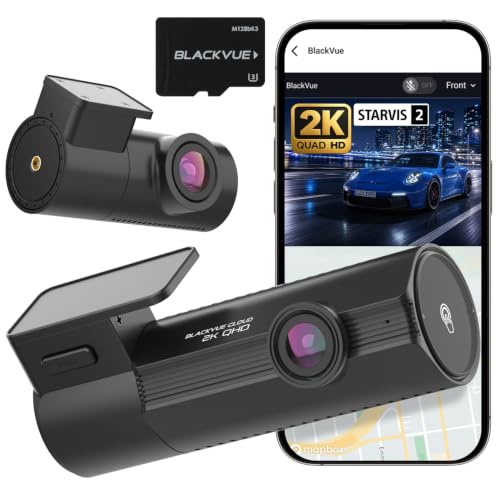
BlackVue Elite 8
Power saving mode idles below 1 mA for multi-day parking surveillance.

THINKWARE F70 PRO
Ships with the hardwiring cable, so every parking mode works from day one.
How a Dash Cam Keeps Recording With the Engine Off
Parking mode is a low-power watch state. When the ignition goes off, the camera stops normal loop recording and saves clips only when something happens, or records a slow time-lapse. Most cameras offer some mix of these:
- Impact detection: the G-sensor wakes the camera when the car is bumped and locks the clip.
- Motion detection: the lens watches for movement in front of the car and records when it sees some.
- Time-lapse: continuous footage at a very low frame rate.
- Energy saving or radar modes: the camera sleeps and wakes only on an impact or when a radar sensor sees movement, which stretches recording time.
Buffered recording is the feature to look for. A buffered camera keeps a few seconds in memory, so the saved clip shows the car backing toward you, not just the jolt after it hits.
Every one of these modes needs power after you shut the car off. Most 12V accessory sockets go dead with the ignition, so the usual answers are a hardwire kit tapped into the fuse box, a plug-in OBD-II power cable, or a separate dash cam battery pack. Vantrue’s own guide to hardwiring a dash cam for parking mode compares those three options and notes that whether a socket stays live depends on the vehicle.
What to Look For in a Dash Cam for Parking Mode
These decide whether you get a usable clip and still start the car in the morning:
- A low-voltage cutoff you can adjust. It shuts the camera down before the battery gets too low to crank.
- Hardwire cable in the box, or a clear part number.
- A supercapacitor instead of a lithium battery. It copes better with summer heat and January cold.
- A high-endurance microSD card. Parking mode writes to it around the clock.
- Remote alerts if you want them. Phone alerts usually need LTE, a hotspot or a subscription.
Rules on recording audio and filming people vary by state, so check local law before you leave the cabin microphone on.
Best Dash Cam with Parking Mode: Six Cameras Up Close
Each camera below records while parked. Check what the listing says about power cables before you order.
1. THINKWARE U3000: 4K Front and 2K Rear Dash Cam with Built-In Radar Parking Mode
- 4K front and 2K rear recording
- Built-in radar for low-power parking watch
- Buffered 20-second event clips
- Built-in GPS, Wi-Fi and Bluetooth
The THINKWARE U3000 is a two-channel dash cam that records 4K video at the front and 2K at the rear, using Sony STARVIS 2 sensors and what THINKWARE calls Super Night Vision 4.0 for low-light footage. An adjustable bitrate lets you trade file size for sharper video, and the built-in GPS logs speed and location and warns of red light and speed cameras.
Its main appeal for parking is the radar built into the front unit. In radar parking mode the camera stays in a low-power state while the radar watches for movement, then wakes and saves a 20-second clip when something comes close or bumps the car. The mode is buffered, so the clip includes the seconds before the trigger. THINKWARE notes that it needs fixed wiring or an OBD-II cable, since a plug-in socket usually loses power with the ignition.
Bluetooth pairing and the THINKWARE Link app handle settings and recent clips on your phone. The THINKWARE CONNECTED app adds remote live view and impact notifications, but it needs an internet connection, and carrier charges may apply. The U3000 suits a driver who parks on the street or at work for long shifts and wants coverage without running the battery hard. It is more camera than someone who only needs basic driving footage.
View THINKWARE U3000 on Amazon
2. BlackVue Elite 8: 2K Front and Rear Dash Cam with Power Saving Parking Mode
- 2K QHD front and rear at 30 fps
- Under 1 mA standby in power saving mode
- 10-second pre-event parking recording
- Wi-Fi, GPS and cloud features
The BlackVue Elite 8 is a front and rear dash cam that records 2K QHD video at 30 frames per second from both cameras, using STARVIS 2 sensors with dual HDR to balance bright skies and dark shadows. This bundle includes a 64GB card, and the camera supports microSD cards up to 1TB for longer recording.
BlackVue built its parking features around low power use. In Power Saving Mode the camera draws less than 1 mA on standby and captures an impact within about a second, which BlackVue says allows stable multi-day recording, even in high temperatures. The standard parking mode detects motion and impacts and saves footage from 10 seconds before each event, and a time-lapse option records continuously at a low frame rate. The listing is clear that hardwiring is required for parking surveillance.
Built-in Wi-Fi lets you view and download clips on your phone without removing the card, and BlackVue’s cloud features add remote access once the camera has an internet connection. The Elite 8 suits a car that may sit at an airport lot or in a driveway for several days. Drivers who want 4K front footage should look at a higher model instead.
View BlackVue Elite 8 on Amazon
3. THINKWARE F70 PRO: 1080p Front Dash Cam with Hardwiring Cable and Buffered Parking Mode
- 1080p Full HD at 30 fps, 140-degree lens
- Hardwiring cable and 32GB card included
- Motion, impact, time lapse and energy saving modes
- Voltage monitoring with automatic shutoff
The THINKWARE F70 PRO is a compact, front-only dash cam that records 1080p Full HD video at 30 frames per second through a 140-degree lens with WDR. This bundle is built around parking use: it includes the hardwiring cable, a 32GB microSD card, a 12V power cable and the windshield mount, so you do not need to track down a separate kit.
Once wired to the fuse box, the camera switches into parking surveillance automatically when the ignition turns off. Motion detection, impact detection, time lapse and energy saving modes are all available, and built-in voltage monitoring shuts the camera off to protect the battery. Impacts lock a 20-second clip, 10 seconds before and 10 after, into a protected folder, and Super Night Vision brightens footage in dark garages.
A supercapacitor and thermal sensor replace a lithium battery, which helps in a hot summer cabin. The THINKWARE DASH CAM LINK app handles settings and downloads over Wi-Fi and Bluetooth, while GPS speed and red light alerts need the separate THINKWARE GPS antenna. The F70 PRO suits a driver who wants dependable parking coverage at the front of the car and nothing more. It does not record the rear, and 1080p shows less fine detail than 2K or 4K cameras.
View THINKWARE F70 PRO on Amazon
4. BlackVue DR770X II: 1080p Front and Rear Dash Cam with Hardwire Cable Included
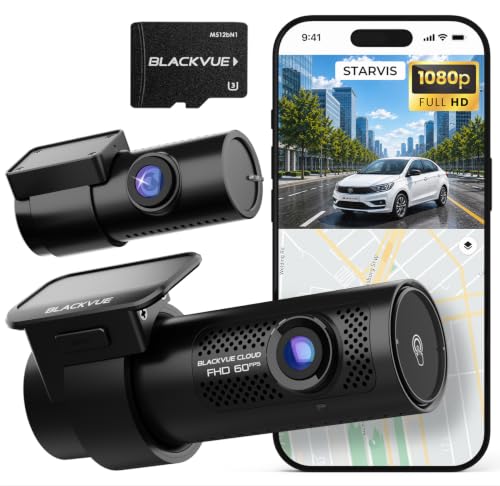
- 1080p front at 60 fps, 1080p rear at 30 fps
- Hardwire cable and 64GB card included
- Motion, impact and time-lapse parking modes
- Supercapacitor and 10-second pre-event buffer
The BlackVue DR770X II is a front and rear dash cam with Full HD on both ends: 60 frames per second at the front and 30 at the rear. Sony STARVIS sensors and BlackVue’s image tuning help with low light, and footage is saved with H.264 encoding. The listing includes the hardwire cable, a USB-C power cable kit and a 64GB microSD card, and the camera supports cards up to 1TB.
With the car off, the camera moves into parking mode and records events triggered by motion or impact, and a time-lapse setting gives continuous coverage while saving storage. Hardwiring is required for this, which is why the cable comes in the box. A G-sensor and GPS detect impacts, sudden movement and overspeeding, saving footage from 10 seconds before each event and protecting up to 50 files from being overwritten.
A built-in supercapacitor helps finish saving a file if power drops. Wi-Fi gives quick phone access, and BlackVue Cloud features such as live view and push alerts work through a hotspot or the optional CM100G LTE module, sold separately. The DR770X II suits a driver who wants rear coverage and complete parking hardware in one purchase. Plates at a distance will be clearer on a 2K or 4K camera.
View BlackVue DR770X II on Amazon
5. 70mai A510: 2.7K Front and Rear Dash Cam with Time-Lapse Parking Surveillance

- 2.7K front camera with Sony IMX675 sensor
- Time-lapse and collision detection when parked
- Built-in Wi-Fi and GPS, 4G LTE support
- 64GB card included, 32 to 256GB supported
The 70mai A510 is a front and rear dash cam with a 2.7K front camera built on a Sony IMX675 sensor, a six-glass lens and an F/1.8 aperture. HDR and enhanced night vision help with headlights, dark lots and unlit roads. It comes with a 64GB card and accepts microSD cards from 32 to 256GB, overwriting the oldest footage when the card fills.
Parked, the A510 offers two modes: time-lapse recording for continuous low-frame-rate coverage, and collision detection that uses the G-sensor to lock footage when the car is hit. Locked files are stored separately so loop recording cannot erase them. Note that 70mai lists the UP05 hardwire kit as a requirement for parking surveillance, and it is sold separately, so budget for it when you order.
Built-in Wi-Fi connects the camera to the 70mai app for viewing, downloading and changing settings such as resolution and G-sensor sensitivity, and built-in GPS records location and speed. The listing also mentions 4G LTE support, which adds remote access when paired with the right hardware. The A510 suits a driver who wants front and rear coverage and the option of checking on a parked car remotely. Without the hardwire kit, it works only as a driving recorder.
6. ROVE R2-4K: 4K Front Dash Cam with 24-Hour Parking Mode and Supercapacitor

- 4K UHD front recording, 150-degree lens
- Parking mode, motion detection and time-lapse
- Built-in GPS and Wi-Fi 6
- Supercapacitor, supports up to 512GB cards
The ROVE R2-4K is a single-channel front dash cam that records up to 2160p through a 150-degree lens. ROVE pairs a Sony IMX415 sensor with a six-glass lens and an F1.5 aperture for its Super Night Vision, which helps in parking garages and dark streets. A 2.4-inch screen on the unit lets you check the camera’s view without reaching for a phone.
For parked use, the camera lists parking mode, motion detection and time-lapse video, along with a G-sensor, emergency video lock and loop recording. Like most cameras in this group, it needs constant power to keep watching after you switch off, and ROVE sells a hardwire kit with low-voltage protection that lists the R2-4K among its compatible models. A supercapacitor stands in for a lithium battery, which suits hot and cold cabins.
Built-in GPS records location and speed, and Wi-Fi 6 links the camera to the ROVE app for downloads and firmware updates. No memory card comes in the box, so add a microSD card of Class 10, U3 speed, up to 512GB. The R2-4K suits a driver who mainly wants a sharp front view and a screen on the unit. It does not record the rear or the cabin.
Parking Features Side by Side
Feature names follow each maker’s listing.
| Camera | Cameras | Parking recording | Power for parking mode |
|---|---|---|---|
| THINKWARE U3000 | Front and rear | Built-in radar, buffered 20-second clips | Hardwiring or OBD-II cable |
| BlackVue Elite 8 | Front and rear | Motion, impact, time lapse, 10-second pre-event | Hardwiring required |
| THINKWARE F70 PRO | Front only | Motion, impact, time lapse, energy saving | Hardwiring cable included |
| BlackVue DR770X II | Front and rear | Motion, impact, time lapse | Hardwire cable included |
| 70mai A510 | Front and rear | Time-lapse and collision detection | UP05 hardwire kit, sold separately |
| ROVE R2-4K | Front only | Parking mode, motion detection, time-lapse | ROVE hardwire kit, sold separately |
Cold Batteries and Parking Mode in West Michigan
A battery that turns the engine over easily in July can struggle on a January morning, because cold slows the chemistry inside it. Add a camera drawing current through a long night in a parking lot and the margin gets thin. Short winter trips make it worse.
Set the cutoff voltage on the cautious side from November to March, even if that means fewer hours of recording. If the car sits for days, switch to impact-only or energy saving mode, or turn parking mode off. An older battery deserves a load test before you add any constant draw.
If the battery is dead most mornings even with the camera unplugged, the dash cam is not the cause. Our guide to why a car battery dies overnight walks through the common sources of parasitic drain and how to narrow them down.
When the Install Is the Real Problem
Most hardwire kits connect through fuse taps, and a tap on the wrong circuit causes trouble. The camera may never enter parking mode, may stay on with the key out, or a fuse may blow. If one fuse keeps failing after an install, read our explainer on why a car fuse keeps blowing before you swap in a bigger one.
Never fit a larger fuse to stop a blow; that only moves the damage to the wiring. When a drain, a blown circuit or a warning light shows up after a camera install, our car electrical repair in Grand Rapids can trace the fault. Electrical diagnosis is one of the areas where our head mechanic carries both ASE and State of Michigan certification.
More Buying Guides
Frequently Asked Questions
What is the best dash cam for parking mode?
The one that pairs buffered recording with a reliable low-voltage cutoff. Radar models like the THINKWARE U3000 and low-draw models like the BlackVue Elite 8 suit long stays, while the THINKWARE F70 PRO is a simpler front-only option that includes its hardwiring cable.
Does parking mode drain the car battery?
It draws a small current all the time it runs. A hardwire kit or camera with a low-voltage cutoff shuts down before the battery gets too low to start the car, but without a cutoff a dash cam can flatten a battery, especially an older one in cold weather.
Do I need a hardwire kit for parking mode?
Usually yes, or an OBD-II power cable or a dash cam battery pack. Most 12V sockets switch off with the ignition, so a camera plugged into one stops recording when you park.
What does buffered parking mode mean?
The camera keeps a few seconds of video in memory while it watches. When motion or an impact triggers it, the saved clip starts before the event, so you see the other car approach instead of only the bump.
Car going flat after a dash cam install, or a fuse that won’t stay in one piece? Call 456 AutoFix at 616-279-3832 between 8am and 5pm on weekdays, or set up an electrical check on our contact page.
If your schedule keeps the car busy during the day, leave it with us through the after-hours drop-off at our Creston shop, 456 Carrier St NE.