As an Amazon Associate, 456 AutoFix earns from qualifying purchases. Product links below go to Amazon, where you can confirm the right part for your vehicle.
The launch x431 vs foxwell nt710 question usually comes up once a basic code reader stops being enough. You want a touchscreen tool that can run active tests, bleed ABS brakes and handle relearns after a repair, without paying a yearly fee. Both brands sell exactly that kind of tablet, but they package the vehicle software in very different ways.
Foxwell ships each NT710 loaded for one car make. Launch puts the X431 name on a whole family of tools, so we matched the NT710 against the X431 Creader Elite 2.0 FGC, a Launch tablet built for GM, Ford and Chrysler group vehicles. The Foxwell NT726 joins them as the all-makes option. For scanners at every budget, see our guide to the best OBD2 scanner for DIY mechanics.
Quick answer
Is a Launch X431 or a Foxwell NT710 the better buy for you?
Pick the Foxwell NT710 if every car you work on comes from one make and you want deep service functions for it. Pick the Launch X431 Creader Elite 2.0 FGC if your driveway mixes GM, Ford and Chrysler vehicles or you want ECU coding. Choose the Foxwell NT726 for mixed imports and domestics.
Our Quick Picks
The Foxwell NT710 for GM and the Launch X431 Creader Elite 2.0 FGC meet at the same level, and the Foxwell NT726 covers all major makes. All three are reviewed below.

Foxwell NT710 for GM
A one-make tablet with a deep GM service menu.

Launch X431 Creader Elite 2.0 FGC
One Launch tablet for the main domestic vehicle groups.
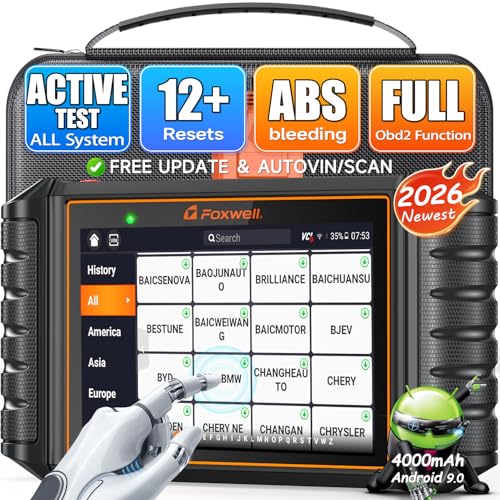
Foxwell NT726
Foxwell's route for garages with mixed makes.
The first two cards sit at the same level and price bracket, so they form the real contest. The third card shows where to look if your household owns cars from several makers.
What the X431 Name Covers on a Launch Box
Launch Tech has made diagnostic equipment since 1992, and its company overview describes the X-431 series as its core line of diagnostic tools. Over the years that label has been printed on handheld readers, mid-size tablets and full workshop scanners. Two tools can both say X431 and still be miles apart in coverage.
That is why comparing “an X431” to the NT710 only works once you choose a specific model. A full all-makes X431 tablet belongs in a different class, closer to the shop tools in our Foxwell vs Launch comparison. The Creader Elite 2.0 FGC is the closer rival, because it also narrows its software to particular vehicle groups.
Foxwell keeps its naming tighter. The NT710 is one piece of hardware, a 5.5-inch Android tablet, sold with software for a single make. Foxwell’s NT710 product page lists versions for GM, Ford, Chrysler, Toyota, Honda, BMW, VAG, Volvo and others, and says software for any additional make is purchased separately.
One Make Deep or Three Groups Wide
The software model is the heart of the decision. A single-make NT710 goes deep on one brand: the GM version lists crankshaft relearn, battery registration, fuel composition reset, CVT functions and air suspension work alongside the usual oil, brake and steering services. The Creader Elite 2.0 FGC spreads its coverage over GM, Ford, Lincoln, Mazda, Chrysler, Dodge and Jeep in one box.
| Feature | Foxwell NT710 (GM) | Launch X431 Creader Elite 2.0 FGC | Foxwell NT726 |
|---|---|---|---|
| Makes included | GM brands only | GM, Ford and Chrysler groups | All major makes |
| Active tests | Yes, bidirectional | Yes, bidirectional | Yes, 3,000+ listed |
| Service functions | GM services incl. CKP relearn | 100+ listed | 12 listed |
| ECU coding | Not on GM listing | Listed | Not listed |
| Updates | Lifetime free, WiFi | Lifetime free | Lifetime free |
Hardware is close. The NT710 runs Android 9.0 with 32GB of storage and a 4,000mAh battery, while the FGC tablet runs Android 8.1 with 16GB of storage and a 3,000mAh battery. Neither listing asks for a subscription, and both update over WiFi.
Launch X431 vs Foxwell NT710: The Three Tools Reviewed
Two of these listings have been reviewed on our site before, and each section says where. Coverage still depends on year, model and engine, so check your own vehicle with the seller before you order.
FOXWELL NT710 for GM: Bidirectional All-System Scan Tool with GM Service Resets
- Full-system diagnostics for Chevrolet, GMC, Buick and Cadillac
- Bidirectional active tests on fans, pumps, doors and lights
- Crankshaft relearn, ABS bleeding, EPB, oil, TPMS and DPF
- Android 9.0, 5.5-inch screen, 4,000mAh battery, 32GB
The NT710 for GM is the Foxwell half of this comparison, and the same listing already appears in our Duramax code reader roundup. Foxwell presents it as an upgrade from the NT510 Elite, now on an Android 9.0 tablet with a 5.5-inch touchscreen, 32GB of storage and a 4,000mAh battery. This version is loaded for Chevrolet, GMC, Buick and Cadillac vehicles.
On supported models it opens every system the listing names, from engine and transmission to ABS, airbags and tire pressure monitoring. Bidirectional control lets you command windows, mirrors, lights, fuel pumps and cooling fans to confirm whether a part responds. The service menu is the strong point: crankshaft relearn, ABS bleeding, oil and parking brake resets, battery registration, steering angle, throttle, TPMS, DPF, CVT, injector coding, air suspension and fuel composition reset all appear. A 4-in-1 live data graph and PDF reports shared over WiFi or Bluetooth help when you want to compare sensors or keep records.
All GM functions come with the purchase, and the listing promises lifetime free updates with no subscription. The limit is the single make. A Ford, Toyota or Honda in the same driveway needs another NT710 version or extra software, so it suits owners who stay loyal to GM. Send your VIN to confirm features before ordering.
View Foxwell NT710 for GM on Amazon

LAUNCH X431 Creader Elite 2.0 FGC: Bidirectional Scan Tool for GM, Ford and Chrysler with ECU Coding
- Full-system diagnostics for GM, Ford and Chrysler groups
- Bidirectional control and ECU coding
- 100+ service functions and FCA AutoAuth for 2017+
- Android 8.1, quad-core CPU, 3,000mAh battery
This is the Launch X431 side of the match and a new listing for our site. The Creader Elite 2.0 FGC is a touchscreen tablet running Android 8.1 on a 1.3GHz quad-core processor, with 2GB of memory, 16GB of storage and a 3,000mAh battery. FGC stands for its three vehicle groups: GM, Ford and Chrysler, with Buick, Cadillac, Chevrolet, Dodge, Jeep, Lincoln, Ford Europe and Mazda named in the built-in software.
The listing describes an all-systems scan of every available module, with code reading and clearing, live data, freeze frame and ECU information. Bidirectional tests cover parts such as windows, mirrors, wipers and the horn, and the tool can readapt or reconfigure some components after a repair. More than 100 service functions are included, among them oil and parking brake resets, ABS bleeding, idle relearn, DPF regeneration, power balance, ride height adjustment and transmission relearn. ECU coding lets you change some factory settings, and FCA AutoAuth handles the secure gateway on 2017 and newer Chrysler group models.
Updates are free for life, and the tablet activates itself over WiFi without an account. Coverage runs from 1996 to current cars, pickups, SUVs, vans and 12-volt diesels. It does not cover European or Asian makes beyond Mazda, so import owners should look elsewhere.
View Launch X431 Creader Elite 2.0 FGC on Amazon
FOXWELL NT726: All-Makes Bidirectional OBD2 Scanner with 12 Service Resets
- All-system diagnostics for 100+ vehicle brands
- 3,000+ active tests listed
- 12 resets including ABS bleed, EPB, SAS and TPMS
- 5.5-inch touchscreen, 32GB storage, hard case
The NT726 is the closely related third pick, for readers who like the NT710 but own cars from more than one maker. We have covered this listing before in our Discovery 4 diagnostic tool guide. Instead of one make in depth, it carries software for more than 100 brands on a 5.5-inch touchscreen that Foxwell says works with gloves, with 32GB of storage and a hard carrying case.
The listing claims in-depth diagnostics for more than 22 vehicle systems, built-in code lookup, a 4-in-1 live data view and one-click PDF reports. Active tests can run ABS pumps, windows, injectors and cooling components, and the listing counts more than 3,000 of them. Twelve service functions are named: ABS bleeding, oil and parking brake resets, steering angle calibration, DPF regeneration, TPMS reset, injector coding, throttle matching, window and door control, transmission adaptation, suspension reset and battery registration. FCA AutoAuth is listed for 2018 and newer Chrysler group vehicles with a 12+8 adapter.
Updates are free for life, and Foxwell includes one year of after-sales support. The trade-off is depth per make: twelve services is a shorter menu than a single-make NT710, and ECU coding is not listed. It suits households where a Honda, a Ford and a European car share one tool.

Which Tablet Suits Your Driveway
Start with a list of every vehicle you expect to scan in the next few years, including the ones belonging to family members who will ask for help.
| Your situation | Better fit | Why |
|---|---|---|
| Two Chevy or GMC trucks, nothing else | Foxwell NT710 for GM | Deep GM service list on one make |
| A Silverado plus an Escape or a Grand Cherokee | Launch Creader Elite 2.0 FGC | GM, Ford and Chrysler groups in one tablet |
| You want to change factory settings | Launch Creader Elite 2.0 FGC | ECU coding named on the listing |
| A Honda, a Ford and a European wagon | Foxwell NT726 | All major makes with core resets |
| You only own Toyotas or Hondas | Foxwell NT710 (matching version) | Single-make software for that brand |
For a single-brand household, the launch x431 vs foxwell nt710 choice leans toward Foxwell. You get a larger battery, more storage and a service menu written for that one make. If you later buy a car from another maker, though, you either pay for more software or carry a second tool.
A mixed domestic driveway changes the math. The FGC covers three vehicle groups at once and adds FCA AutoAuth for 2017 and newer Chrysler, Dodge and Jeep models, which matters because those secure gateways block many scanners. Ford owners can compare it with the tools in our scan tool roundup for Ford.

Imports, European Cars and Audi Owners
The FGC is built around domestic brands plus Mazda, so it is not the tool for an Audi, a Volkswagen or a BMW. The NT710 can be, but only in its VAG or BMW version, and that version would not help with a family pickup. Foxwell’s page notes that if your make is missing from the menu, you can send the serial number after delivery and have the software switched.
European cars spread their faults across many modules. Our list of common Audi fault codes shows how often warnings come from gateway, comfort and electrical systems rather than the engine. On a garage that mixes an Audi with domestic cars, the NT726 or a VAG-specific NT710 makes more sense than any GM, Ford or Chrysler bundle.
Whatever you choose, read the coverage notes for your exact vehicle. Both makers state that functions vary by model and year, and both invite buyers to send a VIN before purchase.

Salt, Cold Starts and Relearns in West Michigan
Grand Rapids winters keep these tools busy. Road salt eats at wheel speed sensor connectors and sets ABS faults, and a weak battery on a cold morning can trigger a string of odd module codes. Any of the three tablets will read those faults and let you clear them once the cause is fixed.
The service functions earn their keep after the repair. A new battery on many late-model vehicles needs a battery monitor reset or registration, and a crankshaft sensor replacement on GM engines calls for a relearn before some misfire monitors run again. In the launch x431 vs foxwell nt710 contest, both tablets list battery work, while the NT710 GM listing names the crankshaft relearn outright.
Store the tablet indoors during deep cold. Lithium batteries and touchscreens both slow down in a frozen truck cab, and a scan that cuts out halfway through a relearn is worth avoiding.
When a Code Needs a Technician
A bidirectional tool tells you more than a basic reader, but a fault code still names the system that noticed a problem rather than the failed part. A warning on a car that seems to drive normally is a good example, and our piece on a check engine light on but the car runs fine explains why it still needs a look. Wiring, vacuum leaks and sensors can all set the same code.
If a code keeps coming back after the obvious fixes, our check engine light diagnostic service in Grand Rapids traces the circuit and tests the component before any part is replaced. Save the codes, freeze frame and any active test results from your tablet, since they show us what you have already ruled out.
More Buying Guides
Frequently Asked Questions
Can one Foxwell NT710 work on cars from different makers?
Each NT710 ships with software for one make. Foxwell’s product page says software for additional makes is bought separately, so a GM version will not run full diagnostics on a Ford or a Toyota. Order the version that matches your car, or look at an all-makes tool.
Do the Launch X431 Creader Elite and Foxwell NT710 need yearly subscriptions?
Neither listing mentions one. The Creader Elite 2.0 FGC listing states lifetime free updates with its 100+ services included, and the NT710 GM listing says all GM functions come with the purchase plus free lifetime WiFi updates.
Which one handles newer Jeep and Dodge secure gateways?
The Creader Elite 2.0 FGC lists FCA AutoAuth for 2017 and newer Chrysler group vehicles. The NT710 GM version does not cover those brands at all. The Foxwell NT726 lists FCA AutoAuth for 2018 and newer models, with a 12+8 adapter required.
Will these tablets work on a diesel pickup?
The FGC listing names 12-volt diesel, light-duty trucks and pickups among its supported vehicles, and the NT710 GM listing includes DPF functions. Heavy-duty 24-volt trucks are outside both. Send your VIN to the seller to confirm before buying.
Scanner pointing you somewhere you would rather not go alone? Ring 456 AutoFix at 616-279-3832 between 8am and 5pm, Monday to Friday, or request an appointment through our contact page.
Daytime hours not working for you? Bring the car by 456 Carrier St NE, Grand Rapids, MI 49505 after we close and use the after-hours drop-off, with a note of the codes your tablet found.