As an Amazon Associate, 456 AutoFix earns from qualifying purchases. Product links below go to Amazon, where you can confirm the right part for your vehicle.
When you drive strangers around for a living, a camera that only watches the road covers half the story. The best dash cam for Uber drivers records the street ahead and the back seat, sees faces in a dark cabin, and keeps running through long shifts without fuss.
Below: what to look for, six cameras with an interior lens, and safe wiring. For dash cams in general, start with our overview of front, rear and cabin dash cams.
Quick answer
Which dash cam should an Uber driver buy?
Pick a camera with a cabin lens and infrared LEDs so riders show up at night. The COOAU D30S is a simple front and cabin unit. The VIOFO A329S adds a rear camera for rear-end claims, and the Rexing S3 watches the side doors where riders climb in and out.
Our Quick Picks
Three cameras that cover the main rideshare setups: front and cabin, three channels with a rear view, and a side camera for the doors. Three more are reviewed below.

COOAU D30S
One windshield unit that records the road and the seats, with no rear cable to run.

VIOFO A329S
Adds a rear camera to the cabin and road views for stop-and-go city work.

Rexing S3
A side camera watches the doors where riders get in and out at the curb.
What a Rideshare Camera Has to Handle
A rideshare camera has to settle arguments about what happened inside the car, not just on the road. That changes the shopping list.
- A cabin lens with infrared LEDs. IR LEDs let the interior camera record the seats clearly when the cabin is dark.
- A wide interior view. About 150 degrees or more keeps both rear doors in frame.
- An easy audio switch. Recording rules differ by state, so the microphone should switch off quickly.
- A supercapacitor instead of a battery. Capacitors cope better with a hot dashboard in July and a frozen one in January.
Two, Three or Four Channels for Driving Riders?
A two-channel front and cabin unit is the classic rideshare setup. It mounts in one spot and needs no cable run to the back.
A third camera on the rear glass is worth the extra wiring if you do a lot of airport and downtown work, where you stop often to load and unload. Four-channel kits add side views for larger vehicles.
Uber’s own app has a Record My Ride safety feature, which records trips with your phone’s selfie camera and microphone. It is a useful backup, but it ties up your phone and records only what that one lens sees, so many drivers still run a dedicated camera.
Best Dash Cam for Uber Drivers: Six Cameras Reviewed
Every camera here has an interior lens with infrared night vision. Resolutions, viewing angles and temperature ranges come from each maker’s Amazon listing.
1. COOAU D30S: 2.5K Front and 1080p Cabin Dash Cam with 4 IR LEDs
- 2.5K front and 1080p cabin, or 4K front alone
- 170-degree front and 150-degree cabin view
- 4 IR LEDs and a STARVIS 2 sensor
- Built-in Wi-Fi and GPS, supercapacitor
The COOAU D30S is a two-channel camera made for the setup most rideshare drivers start with: one lens on the road and one on the passengers. With both cameras running it records 2.5K at the front and 1080p in the cabin, with a 170-degree front view and a 150-degree cabin view. If you switch to front-only mode, the main camera records 4K at 25 frames per second.
The cabin camera carries four infrared LEDs, so the back seat shows up in clear black and white footage even when the car is completely dark inside. The front lens pairs an f/1.8 aperture with a STARVIS 2 sensor for night roads and tunnel exits. Built-in GPS ties each clip to your route, location and speed, and Wi-Fi links the camera to the COOAUDash app for settings and downloads without a subscription.
The listing rates the camera for -4F to 158F, helped by a supercapacitor in place of a battery. Parking mode offers collision, motion and time-lapse options, but all three need a hardwire kit that you request from COOAU. Cards up to 256GB are supported and none is included. There is no rear camera, so drivers who want rear-end footage should pick a three-channel model.
2. VIOFO A329S: 4K Front, 2K Cabin and 2K Rear Dash Cam
- 4K front with 2K cabin and 2K rear
- 210-degree fisheye cabin lens
- Wi-Fi 6 and quad GNSS GPS
- Records to microSD up to 512GB or SSD up to 4TB
The VIOFO A329S records three views at once: 4K at 30 frames per second on the road, 2K in the cabin and 2K through the rear glass. All three cameras use STARVIS 2 sensors, with an IMX678 up front and IMX675 sensors for the cabin and rear, and HDR runs on every channel to help with plates and faces in mixed light.
The cabin camera uses a 210-degree fisheye lens, wide enough to take in the front passenger and both rear doors in most cars. That matters in rideshare work, where a rider might sit anywhere. The rear camera covers the traffic behind you, which the cabin lens cannot show clearly, and helps when someone bumps you at a pickup. Thin coaxial cables are meant to tuck neatly under trim, and a polarizing filter comes fitted to the front lens to cut windshield glare.
Storage is generous: microSD cards up to 512GB, or an external SSD up to 4TB through an optional cable, which suits drivers who log long days. Voice commands handle recording, photos and Wi-Fi. Parking mode needs the HK4 or HK6 hardwire kit, which is not included, and the memory card is sold separately. It takes more installation time than a single windshield unit.
3. Rexing S3: 1080p Front, Cabin and Side Rideshare Dash Cam
- Front, cabin and side 1080p cameras
- 170-degree lenses with IR for cabin and side
- Wi-Fi, mobile app and GPS player
- Supercapacitor and 18-month warranty
The Rexing S3 is sold as a rideshare camera and takes a different approach to the third channel. Instead of a rear camera, it adds a side lens, so the three 1080p cameras cover the road, the cabin and the side of the car. Each lens has a 170-degree view, and the listing says the setup is meant to protect both the driver and passenger doors.
That side view earns its place at the curb. Riders open doors into traffic, bikes pass close, and disputes about who hit whom often happen in those few seconds of loading and unloading. Infrared LEDs light the cabin and side views in low light, and the G-sensor locks footage when it detects an impact so loop recording does not overwrite it.
Wi-Fi and the Rexing app let you view and manage clips on iOS or Android, and the Rexing GPS Player shows speed, location and route. A supercapacitor handles temperature swings better than a built-in battery, and the camera accepts cards up to 256GB. Parking monitoring through motion detection or time-lapse needs one of Rexing’s hardwire kits. Resolution is 1080p on all three channels, lower than the 2K and 4K cameras on this list, so plate detail at a distance is more limited.
4. Vantrue N4S: 2.7K 3 Channel Front, Cabin and Rear Dash Cam

- 1944p front, 1440p cabin and 1440p rear
- STARVIS 2 sensors on all three channels
- Rear camera rotates 360 degrees
- 5GHz Wi-Fi, quad-mode GPS and up to 1TB cards
The Vantrue N4S records the road at 1944p and both the cabin and the rear at 1440p, so the interior view is sharper than the 1080p cabin cameras on several models here. Viewing angles are listed as 158 degrees at the front, 165 in the cabin and 160 at the rear, and all three channels use STARVIS 2 sensors with HDR.
The rear camera is the detail that sets it apart. It rotates through 360 degrees, so you can aim it at the traffic behind you or turn it inward to watch the cargo area. That is handy for airport runs, when riders load bags into the back and disputes over damaged luggage can come up. A magnetic mount, static cling film and cable clips are included for a tidy, tool-free install, though the rear camera wiring needs to follow the manual.
Four parking modes cover motion detection with 10 seconds of pre-event recording, collision locking and low bitrate or frame rate recording. The camera supports microSD cards up to 1TB, sold separately, and gets over-the-air firmware updates through the app. Its supercapacitor is rated from -4F to 140F, slightly lower at the top end than some cameras here, which is worth noting if your car sits in full sun all summer.
5. REDTIGER VP40: 4 Channel 360-Degree Dash Cam with 8 IR LEDs
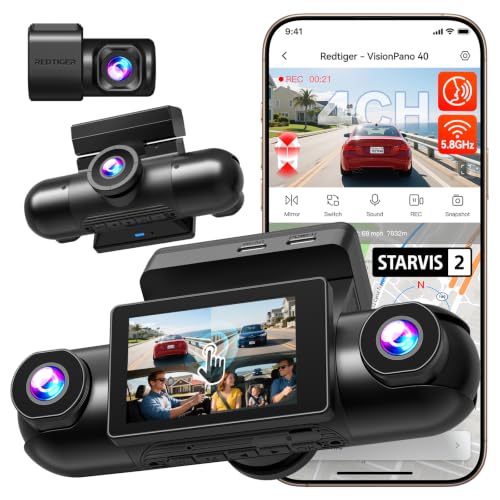
- 2.5K front and rear plus two 1080p side cameras
- Four rotatable lenses
- 8 IR LEDs and dual STARVIS 2 sensors
- Touch screen, voice control, 5.8GHz Wi-Fi and GPS
The REDTIGER VP40 is a four-channel system for drivers who want the most coverage from one kit. It records 2.5K at the front and rear and 1080p on two side cameras, and every lens can be rotated. That lets you point the side units at the doors, the cabin interior or the blind spots, depending on what worries you most.
For rideshare use, that flexibility is the main appeal. You might aim one camera at the back seat and the other at the curb-side door, or cover both doors in a larger SUV. The front and rear cameras use STARVIS 2 IMX675 sensors with dual HDR, and eight infrared LEDs give the side cameras clear footage inside and outside the car after dark. Voice commands and a touch screen handle settings without the app.
The 5.8GHz Wi-Fi link sends footage from all four channels to the REDTIGER Cam app, and built-in GPS logs speed, route and location. Parking mode uses time-lapse recording and needs a hardwire kit bought separately; no memory card is included. Four cameras mean more wiring and much more video to sort through, so it suits full-time drivers better than someone who drives a few evenings a week.
6. ROVE R3: 3 Channel 1440p Front, Cabin and Rear Dash Cam with Touch Screen

- 1440p front, 1080p cabin and 1080p rear
- 3-inch IPS touch screen
- Four hidden IR LEDs for the cabin
- Dual-band Wi-Fi and quad-mode GPS
The ROVE R3 records front, cabin and rear at the same time in 1440p, 1080p and 1080p. Its standout feature is a 3-inch IPS touch screen with a single power button, which lets you change settings and review clips on the camera itself instead of reaching for your phone between rides. A fast dual USB charger comes in the box, leaving a spare port for your phone.
Four hidden infrared LEDs light the cabin camera in complete darkness, and the f1.5 front lens is designed to let in more light on dim streets. Dual-band 5.0GHz and 2.4GHz Wi-Fi pairs with the ROVE app for faster transfers, and quad-mode GPS adds speed, compass and location stamps to each file. The listing also mentions digital image stabilization, time-lapse and remote firmware updates.
It runs on a supercapacitor rather than a battery and includes a 24-hour parking monitor along with G-sensor event locking and loop recording. A memory card is not included; it accepts branded U3 cards up to 512GB. The resolution is a step below the 4K front camera on the VIOFO, and the screen makes the body larger than a screenless unit, so it is more visible on the windshield.
How the Six Rideshare Cameras Compare
The main split is how many views you get and how much wiring you will do.
| Camera | Views recorded | Cabin lens | Suits |
|---|---|---|---|
| COOAU D30S | Front and cabin | 1080p, 150 degrees, 4 IR LEDs | A quick install with no rear cable |
| VIOFO A329S | Front, cabin and rear | 2K fisheye, 210 degrees | Full-time drivers who want rear footage |
| Rexing S3 | Front, cabin and side | 1080p, 170 degrees, IR LEDs | Watching doors at pickup and drop-off |
| Vantrue N4S | Front, cabin and rotating rear | 1440p, 165 degrees | Airport runs with luggage in the back |
| REDTIGER VP40 | Front, rear and two side views | Side lenses turn to face the cabin, IR | Larger SUVs and minivans |
| ROVE R3 | Front, cabin and rear | 1080p, 4 IR LEDs | Drivers who like a touch screen |
Budget for a high-endurance microSD card too. Ordinary cards wear out fast under all-day recording.
Recording Riders: Audio, Notices and Privacy
Recording conversations is different from recording video. Some states require every party to agree before a conversation is recorded, and the rules can change when a trip crosses a state line. We are mechanics, not lawyers, so check your state’s law and Uber’s current driver guidelines before you turn the microphone on.
A small window sticker telling riders the car is recorded is a common habit among drivers, and it heads off surprises. Keep footage private unless an insurance claim or report needs it.
Powering a Rideshare Dash Cam Without a Dead Battery
A plug-in adapter starts and stops the camera with the car. Parking mode, which watches the car while you take a break or sleep, needs a hardwire kit that connects to the fuse box. Choose a kit with a low-voltage cutoff, because a camera that records all night with no cutoff can leave you unable to start the car in the morning.
West Michigan winters make that worse. A cold battery has less to give, and a full-time driver’s car rarely gets a long charging run between short trips. If your car is slow to crank after a night of parking mode, our guide on why a car battery dies overnight explains how to track down the drain.
Fuse taps need the right fuse slot and the right rating. Tap the wrong circuit or overload it and you may find yourself replacing the same fuse again and again, which our article on what to do when a car fuse keeps blowing walks through.
If you would rather not open the fuse panel yourself, or the car already shows flickering lights or warning messages, have the circuit checked first. Our car electrical repair in Grand Rapids covers battery drains, charging problems and wiring faults on foreign and domestic vehicles.
More Buying Guides
Frequently Asked Questions
Does Uber allow drivers to use a dash cam?
Many drivers run one, and Uber offers its own phone-based trip recording through the Driver app. Check Uber’s current driver guidelines and your state’s recording rules first, especially for audio.
Is a front and cabin dash cam enough for rideshare?
For many part-time drivers, yes. A front and cabin unit covers the road and the passengers from one mount. Full-time drivers in heavy traffic gain rear-end evidence from a rear camera.
Will a dash cam drain my car battery?
Not when it is powered from a socket that shuts off with the ignition. Parking mode through a hardwire kit can drain the battery, so use a kit with a low-voltage cutoff and set it to a level that still leaves enough charge to start the car in cold weather.
Why does the cabin footage look black and white at night?
That is the infrared night vision working. When the cabin gets dark, the camera switches on its IR LEDs and records in monochrome, which shows faces more clearly than color would in low light.
Is your rideshare car slow to start, or blowing fuses since the camera went in? Give 456 AutoFix a call at 616-279-3832 between 8am and 5pm, Monday through Friday, or request an appointment on our contact page and we will trace the problem.
Driving shifts that overlap our hours? Use our after-hours drop-off to leave the car at 456 Carrier St NE, Grand Rapids, outside business hours.