
As an Amazon Associate, 456 AutoFix earns from qualifying purchases. Product links below go to Amazon, where you can confirm the right part for your vehicle.
Shoppers who land on topdon vs thinkcar have usually done the hard part already. They have skipped the bare code readers, decided they want a touchscreen tool that can command parts and run resets, and found two brands whose tablets look almost alike on paper. Same Android screens, same Bluetooth dongles, similar lists of service functions. So the useful question is not which logo wins, but which model fits your car and how each one handles updates after you open the box.
This page lines up the two brands at the same level: a wireless tablet from each, plus a phone-based Thinkcar adapter for readers who want something smaller. If you are still deciding whether you need bidirectional control at all, our guide to OBD2 scanners for DIY mechanics covers the simpler options first.
Quick answer
Is a Topdon or a Thinkcar scan tablet the smarter buy?
At the wireless tablet level they are close. The Topdon X800BT lists more reset services and remote help, while the Thinkcar 673BT offers a bigger 7-inch screen and DoIP support. Both state lifetime software updates. Your vehicle’s coverage on each tool should decide it, so check the VIN first.
Our Quick Picks
The Topdon X800BT and Thinkcar 673BT are matched wireless tablets, and the Thinkdiag2 is a smaller Thinkcar option that runs on your phone. All three are reviewed below.

TOPDON X800BT
Topdon's wireless tablet, listed as the successor to the AD800BT2.

THINKCAR 673BT
Thinkcar's wireless tablet with a larger screen and DoIP support.
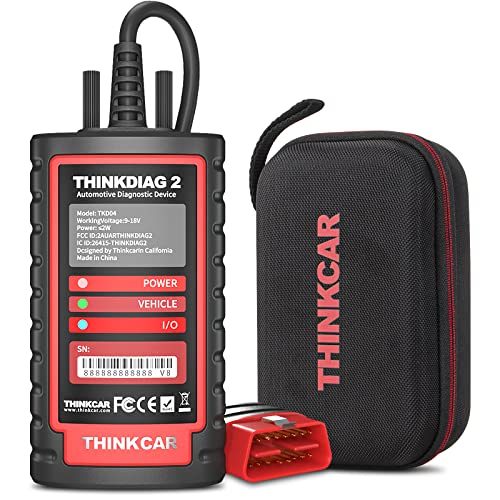
THINKCAR Thinkdiag2
A compact Thinkcar dongle that turns your phone into the screen.
The three cards above are a Topdon tablet, its nearest Thinkcar rival and a pocket-sized Thinkcar adapter that runs on your phone. Each gets a full write-up below, along with where they overlap and where they split.
Two Brands Chasing the Same Buyer
Topdon and Thinkcar both aim at the space between a basic reader and a dealer-level shop system. Each sells a ladder of tools: small Bluetooth adapters that pair with a phone app, mid-size Android tablets, and larger units with ECU coding and topology maps. Both sell on Amazon US under their own brand names, so genuine listings are easy to tell apart from look-alikes.
In a topdon vs thinkcar match-up, the differences are mostly in packaging. Topdon tends to spread its reset count wide and add extras such as TeamViewer remote support. Thinkcar leans on screen size, newer protocol support and, on its upper models, an AI assistant that walks you through a repair. Neither approach is right for every driver, which is why matching tiers matters more than brand loyalty.
Both makers also say the same thing in their listings: menus change with make, model and year, and you should send your VIN before ordering. Take that seriously. A tool that bleeds the ABS on one pickup may show nothing for that job on a compact from the same year.
Matching Models Before You Compare
A fair topdon vs thinkcar test needs matched tools, since a top Thinkcar against an entry Topdon tells you nothing useful. The table pairs tools that share a connection type and a screen class, using each Amazon US listing.
| Tier | Topdon | Thinkcar | Main gap |
|---|---|---|---|
| Wireless tablet | X800BT, 6-inch | 673BT, 7-inch | 34 resets vs 28+; DoIP listed on the 673BT |
| Phone adapter | TopScan family | Thinkdiag2 | Both use an app; update terms differ by model |
| Coding tablet | ArtiDiag Pro | ThinkScan 689BT | Both list ECU coding; check your make |
This article reviews the wireless tablet pair in full, because that is where most home mechanics end up. The phone adapter tier gets one Thinkcar pick, and the coding tablets are better covered in our roundup of bidirectional scan tools under 500.
Topdon vs Thinkcar Scanner Picks, Reviewed One by One
Two of these tools have appeared on our site before, and each review below says where. Coverage changes by vehicle, so treat every feature as something to confirm for your car rather than a promise.
TOPDON X800BT: Wireless Bidirectional Scan Tool with 34 Reset Services
- Full-system diagnostics with active tests
- 34 reset and service functions
- Bluetooth 5.0 VCI, about 33 ft range
- Lifetime software updates listed
The X800BT, sold under Topdon’s VeriDiag name, is the brand’s wireless tablet at the middle of its range, and the listing presents it as an upgrade of the AD800BT2. It pairs a 6-inch 1440×720 touchscreen running Android 10 with 2GB of memory and 64GB of storage. A Bluetooth 5.0 adapter sits in the OBD2 port, and the seller rates the link at up to about 33 feet. We first covered this model in our Autel vs Topdon comparison.
Diagnostics reach engine, transmission, ABS, TPMS, battery, parking brake and chassis modules, along with all ten generic OBD2 modes. Live data can be graphed, recorded and replayed, and AutoVIN identifies many vehicles before an Auto Scan sweeps the whole car. Active tests command parts such as injectors, mirrors, windows and wipers. The listing names 34 service functions, from oil, SAS and battery resets to DPF regeneration, ABS bleeding, injector coding, throttle adaptation and seat calibration.
Topdon lists lifetime software updates, but notes that paid gateway subscriptions are not included. The tool supports FCA, Renault and Nissan secure gateways and CAN-FD, with some access needing an extra purchase. Remote help through TeamViewer Quick Support suits a newer DIYer. It does not list ECU coding, so buyers who want to change module settings should look at a coding tablet instead.

THINKCAR 673BT: 7-Inch Bidirectional Scan Tool with 28+ Resets and DoIP
- All-system scans with active tests
- 28+ reset and maintenance services
- CAN FD and DoIP protocol support
- Lifetime free updates over Wi-Fi
The 673BT is the Thinkcar tablet that lines up most closely with Topdon’s X800BT. It uses a 7-inch 1024×600 touchscreen on Android 10, a quad-core 2.0 GHz processor, 2GB of memory, 64GB of storage and a 4150mAh battery. Like its rival, it talks to the car through a Bluetooth 5.0 adapter rated to about 33 feet. It also appears in our guide to scan tools for trucks, where pickups were the focus.
Scans cover the engine, transmission, ABS, airbag, steering angle, body control, TPMS and battery systems, with codes, ECU information, live data and freeze frame shown as text or charts. Bidirectional control runs actuators such as injectors, fuel pumps, door locks, windows, wipers and mirrors. The listing names more than 28 maintenance services, including oil, airbag, SAS, EPB and TPMS resets, throttle adaptation, battery matching, ABS bleeding and injector coding.
Thinkcar states lifetime free updates over 2.4G or 5G Wi-Fi with no annual fee. CAN FD and DoIP support are both listed, which helps with some of the newest vehicles, and the seller claims coverage of 96+ brands with menus in 28 languages. Available services vary by vehicle, so email your VIN first. It lists fewer resets than the Topdon and no remote support, which matters if you expect to need hands-on help.
THINKCAR Thinkdiag2: Bluetooth Bidirectional OBD2 Adapter with 15+ Resets
- Phone app for iOS and Android
- All-system diagnosis and active tests
- 15+ maintenance resets, CAN-FD
- One year of updates included
The Thinkdiag2 skips the tablet altogether. It is a small Bluetooth adapter that plugs into the OBD2 port and uses an app on an iPhone or Android phone as its screen, which makes it easy to leave in the glovebox. The listing describes it as the upgrade of the original Thinkdiag, with the CAN-FD protocol added for newer vehicles such as 2019 and later GM models. It is new to our site with this comparison.
Despite its size, it reads all available systems, including engine, ABS, airbag, transmission, parking brake, TPMS, steering angle, A/C and battery modules. Active tests let you cycle parts such as the A/C clutch, windows, doors and sunroof from the phone. A separate menu holds 15 common services, among them oil and EPB resets, SAS calibration, ABS bleeding, injector coding and TPMS reset, and the listing adds health reports you can share or print.
The trade-offs are worth knowing. Your phone needs an internet connection to diagnose, the tool works only on 12V vehicles, and FCA AutoAuth requires an account you buy separately. Updates are included for one year, then renew if you want newer coverage. If you would rather not tie diagnostics to your phone, or you plan long relearns, a tablet such as the 673BT is the steadier choice.
View THINKCAR Thinkdiag2 on Amazon

Updates, Gateways and Getting Help
What “lifetime updates” really covers
Both tablets here state lifetime software updates, which removes the yearly renewal question that hangs over many scan tools. For topdon vs thinkcar buyers, the fine print still matters. Topdon notes that its free updates cover software only and not the extra subscriptions some secure gateways require. Thinkcar’s 673BT listing says it updates over 2.4G or 5G Wi-Fi with no annual fee.
The Thinkdiag2 is different. Its listing includes one year of updates, after which you renew to keep adding newer vehicles and fixes. That is a fair trade for a smaller, cheaper tool, but count it in before you choose.
Secure gateway access on newer vehicles
Many 2018 and newer Chrysler, Jeep, Dodge and Ram vehicles lock their modules behind a security gateway. Every tool on this page lists FCA AutoAuth, but that only gives you the login portal. You still register and pay for an account with the automaker’s program before the tool can clear codes or run tests on those models.

European cars bring their own quirks. On an Audi, a warning often lives in the gateway, body or transmission module rather than the engine computer, as our list of common Audi fault codes explains. All three tools claim all-system access, yet the depth of each menu varies, so check the module you care about.
Checking coverage before you order
Topdon runs a vehicle coverage inquiry page where you can ask about a model and function. Thinkcar points buyers to its own coverage lookup and support through the official Thinkcar site. Have your year, model, engine and VIN ready, and ask about the exact reset you need, not just “is my car supported”.
Settling Topdon vs Thinkcar for Your Driveway
Use the way you work as the tiebreaker.
| Your situation | Lean toward | Reason |
|---|---|---|
| You want the longest list of resets | Topdon X800BT | 34 service functions listed |
| You want a friend or tech to help remotely | Topdon X800BT | TeamViewer Quick Support listed |
| You prefer a larger screen in a dim garage | Thinkcar 673BT | 7-inch, 1024×600 display |
| You work on very new vehicles | Thinkcar 673BT | CAN FD and DoIP both listed |
| You want a small tool for the glovebox | Thinkcar Thinkdiag2 | Phone app, active tests, 15+ resets |
On balance, the topdon vs thinkcar choice at this tier is close enough that coverage for your own car should break the tie. If you also want to see how Topdon stacks up against other names, our Topdon vs Launch comparison and BlueDriver vs Topdon breakdown cover those match-ups.

Scanning in a Cold West Michigan Garage
A full-system scan followed by a throttle relearn or battery registration can keep the ignition on for a long stretch. On a January morning in an unheated Grand Rapids garage, a weak battery can sag partway through, and a low voltage reading may abort the procedure or leave fresh codes behind. Hook up a maintainer before any long session, whichever tablet you buy.
Road salt adds another layer. Corroded connectors at wheel speed sensors, under seats or near the battery can log communication faults that look like scanner trouble. Clear them, drive a few cycles and scan again, because a code that returns is real and a one-time fault after a jump start often is not.
When the Codes Don’t Tell the Whole Story
A scanner names the system that logged a fault, but it rarely names the failed part. A warning lamp on a car that seems to drive fine is a good example, and our article on a check engine light on but the car runs fine covers why that still deserves attention. The same code can come from a sensor, a chafed wire or a small vacuum leak.

If the active tests pass and the light keeps returning, a second opinion saves parts money. Our shop offers check engine light diagnostics in Grand Rapids, where we test circuits and components before recommending anything. Bring the saved scan reports from your tablet, since they show what you have already ruled out.
More Buying Guides
Frequently Asked Questions
Is Thinkcar as good as Topdon?
At the wireless tablet level, the two are closely matched. The Thinkcar 673BT and Topdon X800BT both read all systems, run active tests and state lifetime software updates. Topdon lists more resets, while Thinkcar lists a larger screen and DoIP. Coverage for your own vehicle matters more than the brand.
Do Topdon and Thinkcar charge for updates?
It depends on the model. The X800BT and 673BT listings state lifetime software updates, though Topdon excludes paid gateway subscriptions. The Thinkdiag2 includes one year, then needs a renewal to keep adding vehicles. Check the listing for the exact model before you buy.
Will these tools work on a newer Jeep or Ram?
All three list FCA AutoAuth for the secure gateway on many 2018 and newer models. The tool only provides the login, so you must register and pay for an AutoAuth account separately. Without it, you may be able to read codes but not clear them or run tests.
Should I get a tablet or a phone adapter?
A tablet keeps everything on one screen and suits regular DIY work on several cars. A phone adapter such as the Thinkdiag2 is smaller and costs less up front, but it needs your phone and an internet connection. Pick the tablet if you plan frequent resets and relearns.
Got a code your tablet can name but not explain? Call 456 AutoFix on 616-279-3832 any weekday from 8am to 5pm, or send us a booking request online and we will set up a diagnostic visit.
Busy during shop hours? Use our after-hours drop-off: park at 456 Carrier St NE, Grand Rapids, MI 49505, and leave a note describing the warning lights you have seen.