
As an Amazon Associate, 456 AutoFix earns from qualifying purchases. Product links below go to Amazon, where you can confirm the right part for your vehicle.
A plug-in code reader is often the first diagnostic tool a driver buys, and the ancel ad410 vs foxwell nt301 matchup comes up again and again at that price level. Both are small handhelds that draw power from the OBD2 port, read and clear engine codes, and show live sensor data on a color screen. Neither needs a phone, an app or a charger, so the choice comes down to smaller details that matter once the tool is in your glovebox.
Below we lay out where the two readers differ, put their listed specs side by side and review each one. We also add a third pick from Ancel that tests your battery as well as reading codes. If you have not settled on a basic reader yet, our OBD2 scanner guide for DIY mechanics covers wider options, including tools with more systems and service functions.
Quick answer
Should you buy the Ancel AD410 or the Foxwell NT301?
Both read and clear engine codes and show live data. The FOXWELL NT301 adds a larger 2.8-inch screen, an LED readiness light with a speaker and listed live data graphing. The ANCEL AD410 keeps things simple with a 2.4-inch screen and a large code library. If you also want battery tests, look at the ANCEL AD530 PRO.
Our Quick Picks
The two named code readers side by side, plus the ANCEL AD530 PRO for drivers who also want battery, cranking and charging tests. All three are reviewed below.

ANCEL AD410
A plain, plug-in reader that explains engine codes on screen.

FOXWELL NT301
Larger screen and quick readiness checks with a colored LED.
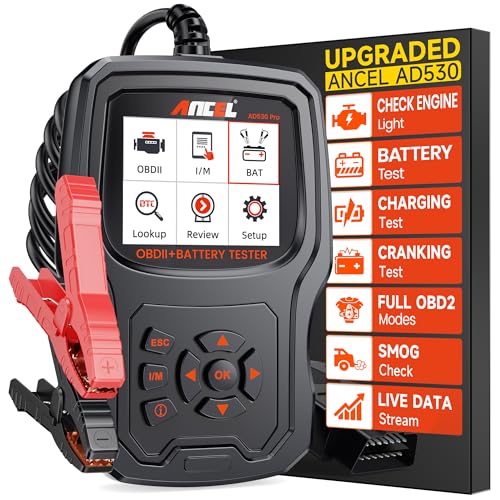
ANCEL AD530 PRO
Reads engine codes and checks the battery, starter and charging system.
Where These Two Readers Part Ways
On the menu screen the two tools look nearly identical. Each one covers the standard OBD2 service modes: stored and pending codes, freeze frame, I/M readiness, the oxygen sensor test, the EVAP test and vehicle information. Each listing also says plainly that the tool reads engine and emission systems only, so neither will touch an ABS, airbag or transmission fault.
The differences are in how the information reaches you. Foxwell gives the NT301 a 2.8-inch screen, dedicated hotkeys for readiness and for reading or clearing codes, and a red, yellow and green LED with a built-in speaker. Its Amazon listing also describes live data shown and logged as graphs. Ancel keeps the AD410 to a 2.4-inch display and a straightforward menu, and leans on a library of more than 42,000 code definitions.
Coverage reads much the same on both listings: most 1996 and newer gasoline cars, SUVs and light trucks sold in the US, plus many European and Asian models from 2000 on. The Foxwell listing also names 12V diesel vehicles with OBD2, which the AD410 listing does not mention. Foxwell’s own NT301 product page confirms the 2.8-inch TFT screen and the readiness hotkeys, and hosts the manuals and update software.
Listed Specs, Line by Line
Every entry below comes from the Amazon US listing for that tool. If a listing is silent on a spec, the table marks it as not stated.
| Point | ANCEL AD410 | FOXWELL NT301 | ANCEL AD530 PRO |
|---|---|---|---|
| Screen | 2.4-inch color | 2.8-inch color | 2.8-inch HD |
| Readiness shortcut | I/M readiness in the menu | One-click hotkey, LED and speaker | I/M hotkey |
| Live data | On-screen readings | Readings plus graphs and logging | Live data streams and freeze frame |
| EVAP and O2 tests | Both listed | Both listed | Both listed |
| Battery testing | Not listed | Not listed | 12V battery, cranking and charging tests |
| Diesel support | Not mentioned | 12V OBD2 diesels named | Not mentioned |
| Updates | Free software updates | Lifetime free updates, no subscription | Not stated on the listing |
The rows that matter most for a daily driver are the screen and the readiness shortcut. Everything else on the list is close to a tie in the ancel ad410 vs foxwell nt301 contest.
Ancel AD410 vs Foxwell NT301 and One Alternative, Reviewed
We have covered the first two tools before, so this section focuses on how they compare with each other. The AD530 PRO is new to our guides and gets a full look of its own.
ANCEL AD410: Enhanced OBD2 Code Reader with 2.4-Inch Color Screen and Live Data
- Reads and clears engine codes
- 42,000+ built-in code definitions
- Live data, freeze frame and I/M readiness
- Powered by the OBD2 port, no app
The ANCEL AD410 is a handheld engine code reader that plugs into the 16-pin OBD2 port and takes its power from the car, so there is no battery to charge and no app to install. We first reviewed it in our Volvo XC60 code reader guide, and here it sits against its closest Foxwell rival. The listing describes more than 42,000 built-in code definitions shown on a 2.4-inch color display.
Beyond reading and clearing codes, it covers the usual OBD2 service modes: live data, freeze frame, I/M readiness, the oxygen sensor test, the EVAP test, vehicle information and MIL status. Live readings include RPM, coolant temperature, fuel trim and O2 sensor values, which helps you see whether a repair worked. Ancel lists support for most 1996 and newer US cars, SUVs and light trucks, many 2000 and newer European and Asian models, and all five main OBD2 protocols.
Free software updates keep the code database current, and the menu comes in several languages. Ancel is clear that the AD410 reads engine and emission codes only, with no ABS, SRS, transmission, bidirectional control or service resets. It suits drivers who want a simple first reader, but not anyone who needs to chase a brake or airbag warning.

FOXWELL NT301: OBD2 Code Reader with 2.8-Inch Screen, I/M Hotkeys and Live Data Graphing
- Reads and clears engine codes
- One-click I/M readiness with LED and speaker
- Live data graphing and logging
- Lifetime free updates, no subscription
The FOXWELL NT301 is a plug-in OBD2 code reader built around a 2.8-inch color screen and a set of hotkeys. It also appears in our DIY mechanic scanner roundup, and in this comparison it is the slightly better equipped of the two named tools. It reads and clears engine codes with one button and needs no charging or setup, since it runs from the OBD2 port.
Its standout feature is the readiness check. One press shows I/M monitor status, and a red, yellow and green LED with a built-in speaker gives the result at a glance, which is handy after a repair or when looking over a used car. Foxwell also lists an EVAP system check, an O2 sensor test and live data that can be viewed and logged as graphs. Coverage is stated as 10,000+ vehicles across all main OBD2 protocols, including many 12V diesels with OBD2.
The listing promises lifetime free updates with no subscription, and Foxwell asks buyers to confirm compatibility by year, make, model and VIN. Like the AD410, it is an engine and emission reader only. It suits drivers who want a clearer screen and faster readiness checks, not those who need ABS or airbag access.
ANCEL AD530 PRO: 2-in-1 OBD2 Scanner and 12V Battery Tester with 2.8-Inch Screen
- Engine code reader and battery tester
- Battery health, cranking and charging tests
- Works with flooded, AGM, GEL and EFB batteries
- I/M hotkey, EVAP and O2 sensor tests
The ANCEL AD530 PRO is the third pick because it answers a question the other two cannot: is the trouble in the engine or in the battery? Ancel describes it as an upgrade from the AD530 and AD410 PRO that combines an OBD2 code reader with a 12V battery tester rated for 100 to 2,000 CCA. It has not appeared in our earlier guides.
On the battery side, the listing describes battery health, cranking and charging system tests, and support for flooded, AGM, GEL, EFB, flat and spiral batteries. That helps you decide whether to recharge, keep or replace a battery before buying a new one. On the engine side it covers reading and erasing codes, live data streams, freeze frame, the O2 sensor test, on-board monitoring and vehicle information, plus an I/M hotkey and an EVAP test.
The 2.8-inch screen offers 16 languages, and the tool needs no app. Ancel lists US vehicles from 1996, European models from 1998 and Asian cars from 1996, and also mentions motorcycles and ATVs. The listing does not state its update terms or any ABS and airbag support, so treat it as an engine and battery tool. It suits drivers who want one device for slow starts and warning lights.
View ANCEL AD530 PRO on Amazon

Matching the Reader to the Driver
Most people asking this question want one thing: to know why the check engine light is on before deciding what to do next. Both readers answer that. The rows below cover the situations where one tool has a real edge.
| Your situation | Better fit | Reason |
|---|---|---|
| You want the simplest tool to keep in the car | ANCEL AD410 | Plain menu, code definitions on screen |
| You struggle to read small screens | FOXWELL NT301 | Larger 2.8-inch display |
| You check readiness after a repair or before buying a used car | FOXWELL NT301 | One-click hotkey with LED and speaker |
| You want to watch a sensor trend over time | FOXWELL NT301 | Listing describes graphed and logged live data |
| Your car is slow to start on cold mornings | ANCEL AD530 PRO | Adds battery, cranking and charging tests |
| You need ABS, airbag or transmission codes | None of the three | All three are engine and emission readers |
If the last row describes you, skip this tier and look at our guide to scanners that read ABS and airbag codes. For everyone else, the ancel ad410 vs foxwell nt301 decision is mainly about screen size and convenience, not capability.

Readiness is the feature people tend to overlook. After a code is cleared, the car has to finish its self-tests before the monitors report ready again. That status also helps when you look at a used car, because a freshly cleared code leaves monitors incomplete, which our guide to scanners for used-car shopping explains in more detail.
Cold Starts, Salt and a Weak Battery
Winter in Grand Rapids is hard on the systems these readers watch. A battery sitting overnight in the cold has less cranking power, and a weak battery can leave a trail of low-voltage codes that point you in the wrong direction. That is the main reason we included the AD530 PRO, since it can check battery health, cranking and charging before you chase an engine fault. For a dedicated tool, see our car battery tester guide.
Road salt causes its own trouble. Corroded connectors on oxygen sensors and EVAP parts can set codes that come and go with the weather. Both the AD410 and NT301 run an O2 sensor test and an EVAP test, which helps you see whether a sensor is slow or a leak is real before you buy parts, and our article on bad oxygen sensor symptoms covers the signs to look for.

Keep the reader inside the cabin rather than in an unheated garage. The Ancel maker page lists an operating range of 0 to 60 degrees Celsius for the AD410, so a tool left frozen in a door pocket may need a few minutes to warm up before the screen behaves. Plug in with the ignition on and the engine off unless you are watching live data.
When a Code Is Only the Start
A code tells you which test the engine computer failed, not which part broke. A P0171 lean code, for example, can come from a vacuum leak, a dirty mass airflow sensor or a weak fuel pump. If your light is on but the car feels normal, our post on a check engine light that stays on while the car runs fine explains why it still deserves attention. The US government’s fuel economy maintenance advice makes the same point: a lit lamp can mean anything from a loose gas cap to a fault that raises emissions and cuts mileage.

European cars add another layer. An Audi or VW may store faults in modules a basic reader cannot open, as our list of common Audi fault codes shows. When a generic reader comes up empty but a warning is still lit, a deeper scan is the next step.
If the code keeps coming back after your fix, bring the car to us. We do check engine light diagnostics in Grand Rapids on foreign and domestic vehicles, testing circuits and parts before anything is replaced. Write down the codes and freeze frame data from your reader, because they give us a head start.
More Buying Guides
Frequently Asked Questions
Is the Foxwell NT301 better than the Ancel AD410?
It is better equipped in a few small ways rather than a different class of tool. The NT301 lists a larger screen, a readiness hotkey with an LED and speaker, graphed live data and 12V diesel support. The AD410 covers the same core engine functions with a simpler layout and a smaller screen.
Can either reader show ABS or airbag codes?
No. Both listings state that they read engine and emission codes only, with no ABS, SRS or transmission support. The AD410 listing also rules out bidirectional control and service resets, and the AD530 PRO listing describes engine diagnostics and battery tests only.
Do these code readers need a subscription?
The NT301 listing promises lifetime free updates with no subscription, and the AD410 listing mentions free software updates. Neither needs a phone app or a battery, since both draw power from the OBD2 port. The AD530 PRO listing does not state its update terms, so check with Ancel if that matters to you.
Does clearing the code fix the problem?
Clearing only turns the light off. If the fault is still there, the engine computer will find it again and the light returns, often within a few drives. Fix the cause first, then clear the code and use the readiness screen to confirm the monitors finish.
Read the code, replaced the part and the light still came back? Call 456 AutoFix at 616-279-3832, Monday to Friday 8am to 5pm, or set up a visit through our contact page.
Short on daytime hours? Bring the car to 456 Carrier St NE in Grand Rapids after work and leave it with our after-hours drop-off.