
As an Amazon Associate, 456 AutoFix earns from qualifying purchases. Product links below go to Amazon, where you can confirm the right part for your vehicle.
A 2002 sedan with 190,000 miles and a 1993 weekend pickup need different diagnostic tools. The best scan tool for older cars is the one built for your car’s model year: a plain OBD2 reader that still speaks the early protocols for 1996 and later, or a make-specific OBD1 reader for anything built before that.
Below is the model-year split that decides which tool will connect, then six readers: four for OBD2 cars and two for 1980s and early 1990s Fords and GMs. Newer cars that need brake, airbag or service functions are covered in our roundup of OBD2 scanners for DIY mechanics.
Quick answer
Which scan tool works on an older car?
For 1996 and newer cars, a simple OBD2 reader does the job: the Launch CR529 lists all five protocols, including the older J1850 and ISO 9141, and the Innova 5110 keeps things basic. Cars from before 1996 use OBD1, so they need a make-specific reader like the Innova 3145 for Ford or the Innova 3123 for GM.
Our Quick Picks
Three picks for the main older-car cases: a plain OBD2 reader, a pre-CAN protocol reader and a pre-1996 Ford reader.

Innova 5110
Codes, readiness, freeze frame and a quick battery check without menus to learn.
Launch CR529
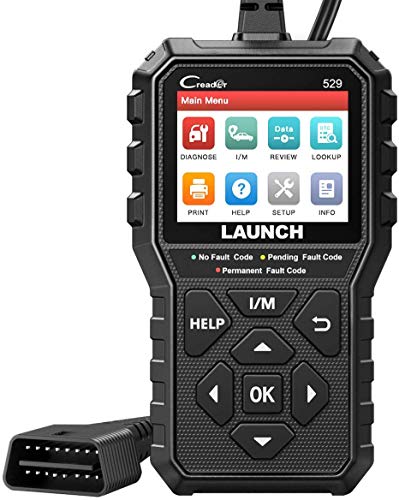
Spells out the older J1850 and ISO 9141 protocols, with graphs and O2 tests.
INNOVA 3145
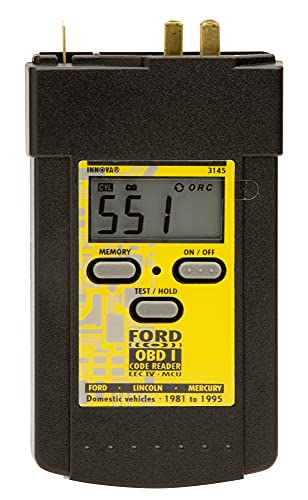
Reads Ford MCU and EEC-IV codes on a digital display.
The Model Year Decides the Tool
The 1996 model year is the line that matters. From then on, cars and light trucks sold in the US carry OBD II: a 16-pin connector near the steering column and standard trouble codes that any generic reader can pull. Before 1996, each maker ran its own OBD I system, with its own connector, codes and test procedure.
Early OBD II cars have a catch of their own. MOTOR magazine’s technical feature OBD II Up Close explains that full compliance was not required until the 1998 model year, and that some earlier cars shipped with monitors such as misfire or evaporative leak detection switched off. A “not supported” monitor on a 1996 or 1997 car can be how it left the factory.
Protocols are the other trap. Cars from 1996 to about 2007 typically use J1850 PWM (common on Fords), J1850 VPW (common on GM), ISO 9141 or KWP2000, while CAN became standard for the 2008 model year. Check that a listing names the older protocols before you buy for a 2001 car.
Reader Features That Matter on an Older Car
An old car has fewer computers to talk to, so a simple handheld covers most needs.
- Named protocols: J1850 PWM, J1850 VPW, ISO 9141, KWP2000 and CAN, not just “works on most cars”.
- Code definitions on screen: no looking up P0171 on your phone in a cold garage.
- O2 sensor test: many pre-CAN cars still answer it, handy with original, high-mileage sensors.
- Readiness and freeze frame: whether the self-tests have run, and the conditions when the fault set.
- Power from the car: OBD2 readers draw power through pin 16, so an old car with a blown accessory fuse may leave the screen dark.
Best Scan Tool for Older Cars: Six Readers Up Close
The first four plug into the 16-pin OBD2 port of 1996 and newer cars. The last two are make-specific OBD1 readers, so check their coverage notes.
1. Innova 5110: Check Engine Code Reader with Battery and Charging Test
- Reads and clears check engine codes on most 1996+ OBD2 vehicles
- I/M readiness monitors for emissions checks
- Freeze frame and Mode 6 data
- Battery and charging system test
The Innova 5110 is a small handheld reader that does one job well: it tells you why the check engine light is on. Innova lists it for most 1996 and newer OBD2 cars, trucks and SUVs, which covers the late-1990s and 2000s cars that make up much of the older fleet. It powers up from the car’s diagnostic port, with no app to set up first.
Beyond reading and clearing codes, it shows I/M readiness, so you can see whether the emission self-tests have run before an inspection or after a repair. Freeze frame records the engine conditions at the moment a fault was stored, and Mode 6 gives access to the results of the car’s own monitor tests. A battery and charging system check helps on an older car where a tired battery or alternator can be behind odd electrical faults.
Pairing it with Innova’s free RepairSolutions2 app adds fix suggestions and maintenance schedules, without a subscription according to the listing. The 5110 does not show live data; Innova points owners who want that, plus drive cycle procedures, to the 5210. The listing also doesn’t name the protocols it supports, so confirm coverage for a 1996 to 2003 car with the seller before ordering.
2. Autel AutoLink AL549: OBD2 Code Reader with ABS Codes and Battery Test

- All 10 OBD2 test modes, including live data and freeze frame
- Reads and erases ABS codes on pre-2020 OBD2 vehicles
- Starting and charging system test
- Prints code data to a Windows PC over USB
The Autel AutoLink AL549 is the newer member of Autel’s AutoLink family, which the listing describes as an upgrade of the AL519, AL529 and AL539. It is a handheld OBD2 reader for 1996 and later vehicles, and Autel says it also covers some recent models. That range suits a household with one old car and one much newer one.
It runs all ten OBD2 test modes: reading and erasing codes, live data, freeze frame, one-click I/M readiness, on-board monitor tests, component tests and vehicle information. The extra that matters on an older car is ABS. The AL549 can read and clear anti-lock brake codes with definitions, but Autel notes this works only on OBD2 vehicles built before 2020, which happens to fit the cars this guide is about.
A built-in test checks the battery, starting and charging system and gives on-screen guidance with the result. The menus come in English, French and Spanish, updates are free for the life of the tool, and a supplied USB cable lets you print stored code data from a Windows PC. It won’t reach airbag, transmission or body modules, so treat it as an engine and ABS tool.

3. Launch CR529: OBD2 Code Reader with Five-Protocol Support and Mode 6
- Lists KWP2000, ISO9141, J1850 VPW, J1850 PWM and CAN
- One-click I/M readiness with red, yellow and green LEDs
- Live data in text and graph form
- O2 sensor test and EVAP test (Mode 8)
The Launch CR529 is a handheld OBD2 reader for 1996 and newer vehicles, and its listing is one of the few that spells out every protocol it speaks: KWP2000, ISO9141, J1850 VPW, J1850 PWM and CAN. For an older car that matters, because the pre-CAN protocols are exactly where some budget tools fall short. It needs no internal battery and runs from the car’s diagnostic port.
The function list is complete for engine and emissions work. It reads and erases codes, shows freeze frame and I/M readiness, graphs live data, and runs the O2 sensor test, the EVAP test (Mode 8) and on-board monitor results (Mode 6). A readiness hotkey with red, yellow and green LEDs gives a quick pass or fail view, and the built-in code library explains each fault on the 2.8 inch color screen.
Launch adds data recording and playback, a diagnostic report, printing through a PC and VIN, CIN and CVN retrieval, which helps confirm a used car’s computer matches its records. Updates are free, but they run through Launch’s own download page and instructions rather than an app. Like the other OBD2 readers here, it stays out of ABS and airbag systems.
4. KONNWEI KW808: 2.8-Inch OBD2 Code Reader with O2 Sensor Test

- Reads and erases codes with on-screen definitions
- I/M readiness, live data and freeze frame
- O2 sensor test and on-board monitoring
- 2.8 inch screen with a 5 ft cable
The KONNWEI KW808 is a straightforward OBD2 code reader with a 2.8 inch screen. Konnwei lists it for most 1996 and newer domestic and import vehicles sold in the US, gasoline or diesel, as long as they are OBD2 or CAN compliant. That takes in passenger cars, SUVs and light trucks, so one reader can serve an old commuter car and an older pickup in the same driveway.
It reads and erases engine codes and shows the definition, then adds I/M readiness, live data, freeze frame, vehicle information, the O2 sensor test and on-board monitoring results. Live data can be shown as a real-time graph, which makes a lazy oxygen sensor or an unsteady coolant reading easier to spot. The O2 test is useful on older cars still running their original sensors.
The box holds the reader, a 5 ft OBD2 cable, a USB cable and a manual. That longer cable lets you rest the tool on the seat or the fender instead of holding it under the dash. No batteries or apps are needed. The KW808 handles engine and emission codes only, so ABS, airbag and other modules need a different tool.
5. INNOVA 3145: Digital OBD1 Code Reader for 1982-1995 Ford Vehicles
- Digital display shows numeric codes, no flash counting
- Most 1982 to 1995 Ford, Lincoln and Mercury cars and trucks
- Works with MCU and EEC-IV control systems
- Keeps codes in memory after unplugging
The INNOVA 3145 is an OBD1 code reader, and it exists because an OBD2 scanner can’t talk to most cars built before 1996. Innova lists it for most Ford, Lincoln and Mercury cars and trucks from 1982 to 1995 that use the MCU or EEC-IV computer systems. That takes in a lot of older Ford pickups, vans and sedans that are still on the road or in restoration.
On these vehicles the factory method was to trigger a self-test and count the flashes of a light or the sweeps of a needle. The 3145 replaces that with a digital display that shows the numeric code directly. Its memory keeps the codes after you unplug it, so you can carry the reader inside and look the codes up with the included instructions, which cover OBD1 operation and Ford’s self-tests.
This is a narrow tool by design. It won’t read OBD2 vehicles, it won’t help on other makes, and some 1994 and 1995 Ford models already switched to OBD2 or to a later system, so check the emissions label and confirm year, model and engine on Amazon before buying. For the right truck, it saves a lot of squinting.
6. INNOVA 3123: OBD1 Code Reader for 1982-1995 GM Cars and Trucks
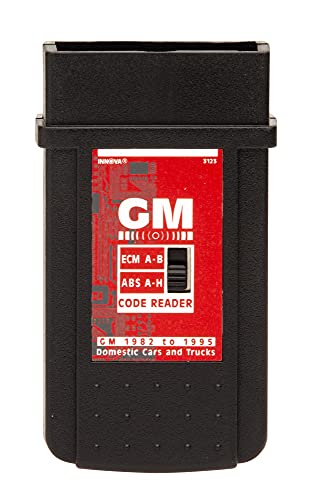
- Reads ECM and ABS codes
- Most 1982 to 1995 GM domestic cars and trucks
- Connects to the self-test connector
- Instructions in English, French and Spanish
The INNOVA 3123 is the GM counterpart to Innova’s Ford reader. It is listed for most General Motors domestic cars and trucks from 1982 to 1995, and it connects to the self-test connector those vehicles use instead of the later 16-pin OBD2 port. If you own an older Chevrolet or GMC truck, or a GM sedan from the same years, this is the kind of tool a generic OBD2 reader can’t replace.
According to the listing, it reads both engine computer (ECM) codes and ABS codes, which is useful because older GM trucks often show both lights. Innova states that it accesses the computer safely and will not harm the vehicle’s computer system. The included instructions are in English, French and Spanish and walk through hooking up and reading codes.
The exclusions are spelled out, and they matter: the 3123 does not read codes on diesel, Cadillac, Geo, Nova or Sprint vehicles. Some late-production GM vehicles also moved to OBD2 before 1996, so check the emissions label and confirm year, model and engine on Amazon before ordering. It is a single-purpose reader for the right vehicle, not a general scan tool.
Which Reader Fits Which Model Year
Confirm the year with the emissions label under the hood, since a handful of 1994 and 1995 cars already had OBD II.
| Model years | Diagnostic system | Reader to use | Watch for |
|---|---|---|---|
| 1982 to 1995 Ford, Lincoln, Mercury | OBD I (MCU, EEC-IV) | Innova 3145 | Some 1994-1995 models switched to OBD II |
| 1982 to 1995 GM | OBD I (self-test connector) | Innova 3123 | Not for diesel, Cadillac, Geo, Nova or Sprint |
| Other pre-1996 makes | Maker-specific OBD I | Factory procedure or a shop | Codes and connectors differ by maker |
| 1996 to 2007 | OBD II, mostly pre-CAN protocols | Innova 5110, Launch CR529, Konnwei KW808 | Early cars may not support every monitor |
| 2008 and newer | OBD II on CAN | Any of the four OBD2 readers, Autel AL549 for ABS | AL549 ABS function covers pre-2020 cars only |
Reading Codes on a Salt-Belt Car That Has Seen Some Winters
Twenty years of West Michigan road salt is hard on wiring. Corroded grounds and green connector pins can set codes that look like a failed sensor, and they can also stop a reader from connecting at all. If the tool won’t link, check the accessory fuse and the port’s pins first.

Cold starts add noise too. A tired battery that sags on a below-zero morning can leave low-voltage or communication codes in an older module. A reader with a battery test, like the Autel AL549, makes that easy to rule out.
Shopping for a used car? Plug a reader in first, since unfinished readiness monitors can mean codes were just cleared. Our guide to buying a high-mileage car covers the rest.
When an Old Car’s Code Needs a Second Opinion
A code names the circuit or system, not the worn part. On an older car, a lean code might trace back to a cracked vacuum hose or an exhaust leak. Our article on a check engine light that’s on while the car runs fine walks through the common causes.
A flashing light means an active misfire, so drive gently and get it looked at soon. European cars from the 2000s also store maker-specific codes beyond the generic set, and our page of common Audi fault codes shows the kind of detail a generic reader can miss.
If you’d rather have the fault tested than guessed at, our check engine light diagnostic service in Grand Rapids checks the parts and wiring behind the code on foreign and domestic vehicles.
More Buying Guides
Frequently Asked Questions
Will an OBD2 scanner work on a 1995 car?
Usually not. Most 1995 and older cars use the maker’s own OBD I system and connector. A few 1994 and 1995 models were built with OBD II early, so look for “OBD II” on the emissions label under the hood before you buy a reader.
Why won’t my scan tool connect to my older car?
Check three things. The reader must support the car’s protocol, such as J1850 or ISO 9141, the ignition must be on, and the accessory fuse that feeds the port’s power pin must be intact. Corroded port pins on salt-belt cars can also block the connection.
What is the best scan tool for older cars from the 1980s?
It depends on the make. For 1982 to 1995 Fords, Lincolns and Mercurys the Innova 3145 is listed for the MCU and EEC-IV systems, and for GM cars and trucks of those years the Innova 3123 plugs into the self-test connector. Other makes need their factory procedure or a shop.
Why does my 1997 car show some monitors as not supported?
Early OBD II cars did not all run every monitor. Makers were allowed to switch off some, such as misfire or evaporative leak detection, on cars built before full compliance in 1998. A “not supported” result on those cars is normal and does not point to a faulty reader.
Have an older car with a code that keeps coming back? Ring 456 AutoFix at 616-279-3832, Monday to Friday 8am to 5pm, or request a diagnostic appointment through our contact page.
Working the same hours we are? Bring it to 456 Carrier St NE after we close, use the after-hours drop-off, and jot the code and model year on a note for the keys.