As an Amazon Associate, 456 AutoFix earns from qualifying purchases. Product links below go to Amazon, where you can confirm the right part for your vehicle.
Subaru owners tend to keep their cars a long time, and an Outback or Forester with a few winters behind it eventually lights up the dash. The best scan tool for Subaru drivers reads more than the engine code: it reaches the ABS, airbag and transmission modules, shows live CVT data, and runs the resets a brake or battery job calls for.
This guide covers what to look for on a Subaru in particular, then reviews six scanners whose listings cover the brand or all 1996 and newer makes. If you want general buying advice for any car first, read our OBD2 scanner guide for DIY mechanics.
Quick answer
What scan tool should a Subaru owner buy?
For brand software in a handheld, the iCarsoft JP V2.0 names Subaru in its listing and adds oil, brake, battery and steering resets. The XTOOL A30D turns a phone into a bidirectional scanner with 19 service functions. The Innova SD35 suits owners who mainly want ABS, airbag and engine codes with repair guidance.
Our Quick Picks
Three scanners that cover the main ways Subaru owners diagnose at home:

iCarsoft JP V2.0
A handheld built around Japanese makes, Subaru included.

XTOOL A30D
Turns an iPhone or Android phone into a bidirectional scanner.
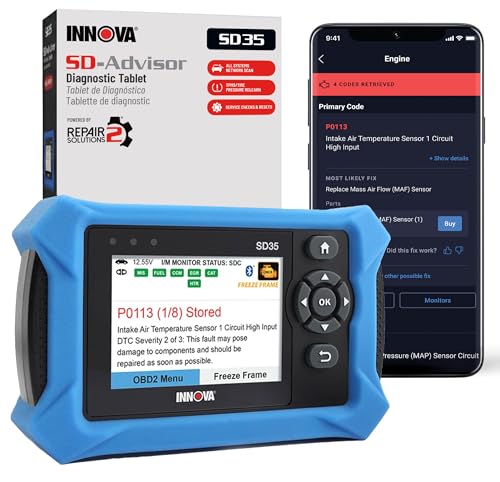
Innova SD35
A tablet scanner paired with a repair-advice app.
Why a Subaru Needs More Than a Basic Code Reader
Every Subaru sold in the US since 1996 has an OBD2 port under the dash, and any reader can pull a generic engine code from it. That covers the check engine light and emissions readiness, and very little else.
The warnings that worry owners most often sit elsewhere. An ABS or traction light, an airbag light or a transmission fault on a CVT-equipped car is stored in a separate module, and a generic reader cannot see it. You need a tool with enhanced, make-level software for those systems.
Subaru’s own diagnostic software, Subaru Select Monitor, is sold to shops by subscription. As I-CAR’s guide to accessing Subaru repair information explains, subscriptions are bought by registering an account at Subaru’s technical information site. That route suits a repair shop, so most owners pick an aftermarket scanner instead.
Five Questions to Ask Before You Order
Scanner listings look alike, so put each one through these checks.
- Does it reach ABS, SRS and transmission? Look for those modules by name, not just “OBD2 functions”.
- Which service resets are listed? Battery registration, electronic parking brake service, steering angle calibration and ABS bleeding are the ones owners use most.
- Can it show CVT data? Transmission fluid temperature and gear data in live data help with fluid service and diagnosis.
- Does the maker confirm your car? Coverage varies by year and model, so send your VIN or use the maker’s coverage checker before buying, especially for a CVT relearn.
- Handheld or phone? A Bluetooth adapter is small enough to live in the glovebox, while a handheld tablet never needs a phone battery.
Best Scan Tool for Subaru: Six Tools Up Close
One handheld carries Japanese-brand software that names Subaru, four are all-makes tools with full-system coverage, and one is a simple reader for engine codes. Features come from each Amazon listing.
1. iCarsoft JP V2.0: Japanese-Brand Diagnostic Scanner with Subaru Coverage and Service Resets
- Listing names Subaru among Japanese makes
- Oil, EPB and battery (BMS) resets
- SAS, throttle (ETC) and ABS bleed functions
- DPF and injector (INJ) functions listed
The iCarsoft JP V2.0 is a handheld scan tool built around Japanese vehicle brands, and its listing names Subaru alongside Toyota, Lexus, Scion, Isuzu, Nissan, Infiniti, Mitsubishi, Honda, Acura and Mazda. That makes it one of the few Amazon-listed handhelds where Subaru appears in the product title itself, rather than being implied by an “all makes” claim. For a household that keeps a Forester next to a Honda or a Toyota, one tool can cover both.
The service functions in the listing title go well past code reading. It names oil service reset, electronic parking brake (EPB) service, battery management (BMS) registration, steering angle sensor (SAS) calibration, electronic throttle control (ETC) relearn, ABS bleeding and injector coding, plus DPF functions for diesel models. Those are the jobs that tend to follow brake pad changes, battery swaps and alignment work, which is when a basic reader leaves you stuck with a warning light.
The Amazon listing returned by the API gives little detail beyond the title, so the exact modules and functions available on your Subaru are worth confirming with iCarsoft by year and model before you order. This is a version 2.0 unit, and iCarsoft has released later JP models since. If you mainly want engine codes and readiness checks, a simpler reader does that job for less.
View iCarsoft JP V2.0 on Amazon
2. XTOOL A30D: Bluetooth Bidirectional Scanner with All-System Access and 19 Resets
- Bidirectional active tests from a phone
- 19 reset and relearn functions
- All major modules, up to 8 PIDs at once
- Lifetime updates, no subscription
The XTOOL A30D is a Bluetooth adapter that plugs into the OBD2 port and pairs with an app on an Android or iPhone, so your phone becomes the screen. The listing gives a range of up to 33 feet and calls for Android 9.0 or iOS 10.0 and newer. It covers most 1996 and newer vehicles, and XTOOL asks buyers to send a VIN and the functions they need so it can confirm compatibility first.
Its main draw is bidirectional control. The listing describes sending commands to the car’s modules to test parts such as the fuel pump, valves, wipers, windows, door locks and headlamps, which helps you tell a failed part from a wiring or signal problem. It also lists all-system access to modules including engine, gearbox, ABS, SRS and air conditioning, with graphed live data showing up to eight values at once.
XTOOL lists 19 service functions without extra charges, including EPB reset, TPMS reset, ABS bleeding, oil reset, SAS reset, battery registration, throttle relearn, injector coding, gear learning and crank sensor relearn. Updates are listed as free for life. The trade-off is that everything runs through your phone, so a dead phone battery or an older handset can stop the job, and functions vary by make and year.

3. THINKCAR THINKSCAN 662: 6.2-Inch Bidirectional Scan Tool with 12 Resets

- ECM, TCM, ABS and SRS diagnostics
- Bidirectional active tests
- 12 resets incl. ABS bleed, BMS, SAS
- 6.2-inch touch screen plus buttons
The THINKCAR THINKSCAN 662 is a handheld tablet scanner with a 6.2-inch touch screen and a set of physical buttons, which helps when you are wearing gloves in a cold garage. It runs Android with a quad-core processor, 2GB of memory and 32GB of storage, and a 4150mAh battery. The listing covers OBD2 vehicles built after 1996 and more than 140 vehicle brands, with a note to send your vehicle details to THINKCAR to confirm coverage.
On the diagnostic side, the listing names the engine and transmission computers along with ABS and SRS, so it can reach the brake and airbag lights a basic reader misses. Bidirectional active tests let you command parts such as injectors, the throttle, cooling fans and pumps to check whether they respond. AutoVIN identifies the car, and live data appears as text or merged graphs, with reports you can save or email.
THINKCAR lists 12 reset functions, including airbag reset, ABS bleeding, battery management, brake reset, throttle adaptation, injector coding, oil reset, steering angle reset, gearbox and TPMS. Updates are listed as free through Wi-Fi. It covers fewer systems than full-system tablets, so if you want every body and comfort module on the car, a full-system tool is a closer fit.
View THINKCAR THINKSCAN 662 on Amazon
4. MUCAR 783BT: 7-Inch Full-System Bidirectional Scanner with 28+ Resets

- Full-system diagnostics incl. ABS, TPMS, BCM
- Bidirectional tests on actuators
- 28+ resets incl. EPB, SAS, BMS
- CAN FD and DoIP protocol support
The MUCAR 783BT is a tablet-style scanner with a 7-inch touch screen, running Android 10 with 2GB of memory, 64GB of storage and a 5000mAh battery. The listing describes it as working with standard OBD2 vehicles from 1996 onward across more than 100 brands, gasoline and diesel, from US, European and Asian markets. AutoVIN reads the vehicle details automatically, which saves typing in model information each time.
It lists full-system diagnostics covering modules such as engine, ABS, transmission, TPMS, body control (BCM), electronic parking brake and steering angle. You can read and clear codes, view graphed live data and check freeze frame records. Bidirectional tests send commands to parts including injectors, fuel pumps, wipers, headlights, door locks, mirrors and ABS assemblies, which helps separate a failed part from a signal problem.
MUCAR lists more than 28 service resets, including oil reset, EPB release, SAS calibration, TPMS relearn, ABS bleeding, battery registration and injector coding. CAN FD and DoIP support is listed for newer vehicles, and updates are free over Wi-Fi with no annual fee. It is a lot of tool for someone who only checks the odd engine light, and coverage of specific functions on your Subaru should be confirmed with MUCAR before buying.
5. Innova SD35: All-System OBD2 Tablet with ABS, SRS and TPMS Codes
- Engine, ABS, SRS and TPMS codes
- Battery and alternator testing
- Oil reset and other service resets
- RepairSolutions2 app with verified fixes
The Innova SD35 is a tablet-based scanner aimed at owners who want more than a check engine reading but not a pile of advanced functions. The listing covers reading and clearing check engine, ABS, SRS and TPMS codes, along with all-system scanning that includes the transmission. Live data shows values such as engine speed, fuel trims, temperatures and oxygen sensor readings, which helps when a code points to a sensor.
It also tests the battery and alternator, which is useful in a Michigan winter when a weak battery can trigger warning lights across several systems. Service functions in the listing include TPMS sensor checks and an oil light reset, among others. Innova pairs the tool with its RepairSolutions2 app for iPhone and Android, which the listing says offers verified fixes from ASE-certified mechanics, suggested parts and cost estimates without a subscription.
The listing states that coverage varies by vehicle and points buyers to Innova’s Coverage Checker, so enter your Subaru’s year and model there before ordering. It does not list bidirectional tests, so you cannot command parts on and off to test them. If you mainly want to understand a warning light and decide whether it can wait, it is a straightforward choice.
6. ANCEL JP700: OBD2 and JOBD Code Reader for Japanese Cars

- Listing names Subaru among Japanese makes
- Supports the JOBD protocol
- Live data, freeze frame, I/M readiness
- No batteries, powered from the OBD port
The ANCEL JP700 is a straightforward code reader rather than a full diagnostic tablet, and its listing names Subaru alongside Toyota, Honda, Nissan and Mazda. Its distinguishing feature is support for JOBD, the Japanese on-board diagnostics protocol, which the listing positions for Japanese-market imports that a generic reader may fail to connect with. For a US-market Subaru, it works as a standard OBD2 engine reader.
The tool reads and clears engine codes, and a built-in code library helps explain what each one means. Live data and freeze frame let you watch sensor values and see the conditions when a fault was stored, which helps with intermittent problems such as a misfire that only appears at highway speed. The I/M readiness function shows whether emissions monitors have finished running, handy after a repair or battery disconnect.
It powers from the OBD port, so there are no batteries to replace, and it has a 128×64 backlit LCD with adjustable contrast. Updates are listed as free and run through a Windows PC. It is limited to engine-related data, so it will not read ABS, airbag or transmission module codes or run service resets. Pick it as a glovebox reader, not as your only tool for brake or battery jobs.
Matching a Scanner to Your Subaru
Start with the jobs you expect to do yourself, then pick the simplest tool that covers them.
| Tool | Format | Beyond engine codes | Good fit for |
|---|---|---|---|
| iCarsoft JP V2.0 | Handheld | Japanese-brand software, oil, EPB, BMS, SAS, bleed resets | Subaru owners who also have another Japanese car |
| XTOOL A30D | Bluetooth adapter and app | All systems, active tests, 19 service functions | Phone users who want two-way control |
| THINKCAR THINKSCAN 662 | Handheld tablet | ECM, TCM, ABS, SRS, active tests, 12 resets | Owners who want a touch screen and buttons |
| MUCAR 783BT | 7-inch tablet | Full system, active tests, 28+ resets | Households with several cars |
| Innova SD35 | Tablet with app | ABS, SRS, TPMS, battery and alternator test | Owners who want repair guidance with codes |
| ANCEL JP700 | Handheld reader | Engine codes, live data, JOBD protocol | Basic engine checks and older imports |
Subaru Jobs That Come Up in a Grand Rapids Winter
Cold mornings in West Michigan are hard on batteries, and a weak one can set a string of odd codes across several modules at once. Charge or test the battery before you chase those codes, and register the new battery afterward if your scanner and model call for it.
Road salt and slush also reach the wheel speed sensors and their wiring. A corroded connector is a common cause of an ABS or traction light after a messy week on the highway, and a scanner that reads ABS codes tells you which corner to look at.
CVT Subarus are another reason to want transmission live data. Fluid service intervals and relearn steps differ by model and year, so follow your owner’s manual and confirm the procedure your scanner supports before you start.
When a Subaru Code Is a Job for the Shop
A code tells you which system noticed a problem, not which part failed. A misfire code can come from a coil, a plug, a leaking injector or low compression. If the light is steady and the car feels normal, our article on a check engine light that stays on while the car runs fine walks through the usual causes.
Maker-specific codes point toward a system and still need testing, which our list of common Audi fault codes shows on another brand. A flashing check engine light, a red brake warning or an airbag light means stop clearing codes and have the car looked at.
If a code keeps coming back after a repair, or you would rather have the parts behind it tested, our check engine light diagnostic service in Grand Rapids handles foreign and domestic vehicles, Subarus included.
More Buying Guides
Frequently Asked Questions
Will a cheap OBD2 reader work on my Subaru?
For engine codes and emissions readiness, yes, on any 1996 or newer model. A basic reader will not see ABS, airbag or transmission codes, though, and it cannot run service resets. For those you need a tool with enhanced, all-system software.
Which scanner can do a Subaru CVT relearn?
None of the listings reviewed here names a Subaru CVT relearn specifically. Some list gear learning or transmission adaptation in general, and coverage depends on year and model. Send your VIN to the maker or use its coverage checker before you buy for that job.
Can I buy Subaru’s own diagnostic software?
Subaru sells access to its technical information and diagnostic software by subscription through its technical information site, mainly for repair shops. You also need compatible interface hardware and a Windows computer, so most owners find an aftermarket scanner simpler.
Is a Bluetooth scanner good enough for a Subaru?
It can be, if the app covers the modules you need. The XTOOL A30D listing names all-system access and bidirectional tests through a phone app. Check that your phone’s operating system meets the listing’s minimum version first.
Got a Subaru code you can’t pin down? Call 456 AutoFix at 616-279-3832, Monday to Friday 8am to 5pm, or set up a diagnostic visit through our contact page.
If your schedule doesn’t match ours, bring the car by after closing and use the drop-off at our Carrier St NE shop in Creston, number 456, with a note on what the dash is showing.