
As an Amazon Associate, 456 AutoFix earns from qualifying purchases. Product links below go to Amazon, where you can confirm the right part for your vehicle.
Searching OBDeleven vs OBDLink MX+ usually means you want a small Bluetooth plug instead of a handheld, and you have spotted two very different ideas of what that plug should be. One is a sealed package with its own app and plans. The other is a fast, open adapter that works with whatever app you choose.
That split matters more than any spec line. Below we explain how each one earns its keep, what it costs to keep running, and which cars favor which plug. Every product detail comes from the Amazon US listing or the maker’s page. If you have not ruled out a handheld yet, our OBD2 scanner roundup for DIY mechanics covers those too.
Quick answer
Which adapter should you buy, OBDeleven 3 or OBDLink MX+?
Choose OBDeleven 3 if you own a Volkswagen, Audi, Skoda or Seat and want coding, adaptations and ready-made tweaks in one app. Choose the OBDLink MX+ if your cars are Ford, GM, Toyota or a mix of brands, because it pairs with FORScan, BimmerCode, Torque and other third-party apps.
Our Quick Picks
OBDeleven 3 and OBDLink MX+ are the two phone adapters in question, and the OBDLink CX is a smaller sibling for BMW and MINI owners who plan to code with BimmerCode.
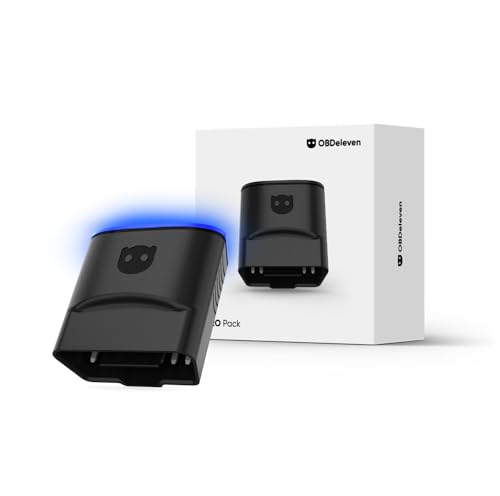
OBDeleven 3 Pro Pack
Built-in coding and adaptations for Volkswagen Group cars.

OBDLink MX+
One fast adapter that runs many different diagnostic apps.

OBDLink CX
A small, stable plug for coding BMW and MINI settings.
A Closed Toolkit Against an Open Adapter
OBDeleven sells the hardware, the app and the plans as one system. You plug the device in, sign in to an OBDeleven account and work through its menus. The maker holds official licenses from the Volkswagen Group, BMW Group, Toyota Group, Mercedes-Benz and US-made Ford, so those cars get scans of many control units rather than the engine alone.
The MX+ comes at the job from the other side. OBD Solutions builds the adapter and includes its own OBDLink app, but much of its value lies in the third-party software it supports. The listing names FORScan, Torque, BimmerCode, DashCommand, AlfaOBD and Carista, and each of those apps brings its own features and its own price.
In practice, the OBDeleven gives you depth on a short list of brands, with the coding knowledge already built into the app. The MX+ gives you reach across almost every 1996 and newer car sold in the US, with depth that depends on which app you pair it with. A Ford owner running FORScan and a Jetta owner running OBDeleven can both end up with dealer-style access, just by different routes.
Neither plug has a screen. Both lean entirely on your phone, so an old handset with a weak battery or a cracked port makes either one harder to live with.
What Each One Costs to Keep Using
The purchase is only the first step with OBDeleven. Reading and clearing faults comes with the device, but manual coding and adaptations need a PRO or ULTIMATE plan. One-Click Apps, such as a service reset or battery registration, are paid with in-app Credits unless you hold ULTIMATE.
The Pro Pack we review below ships with 12 months of PRO and 100 Credits, which covers a year of tinkering for most owners. After that, plan renewal is a separate choice inside the app, so check the terms before the first year runs out. An internet connection is also required whenever you use it.
The MX+ works the other way round. OBDLink states that its own app and the OEM-specific data add-ons are free for MX+ owners, and firmware updates are included. If you add a paid app such as BimmerCode, that cost sits with the app maker, not with OBDLink.
OBDeleven vs OBDLink MX+: The Three Adapters Reviewed
Both headline adapters have been on this site before, so each section notes where. The third pick, the OBDLink CX, is here for BMW and MINI owners, since the OBDeleven 3 also lists BMW Group support and those buyers often weigh both.
OBDeleven 3 Pro Pack: Bluetooth Diagnostic and Coding Tool with 12-Month PRO Plan
- Licensed by VW Group, BMW, Toyota, Mercedes-Benz and US-made Ford
- Manual coding, adaptations and SFD unlock on VW Group cars
- 12-month PRO plan plus 100 Credits for One-Click Apps
- Android 8.0+ and iOS 16.6+, no limit on vehicles per account
This is the same OBDeleven 3 pack we reviewed in our VW scan tool guide, and it stands for the OBDeleven side of this comparison. The box holds the third-generation Bluetooth plug, a year of the PRO plan and 100 Credits. Everything runs through the OBDeleven app on a phone, with no screen on the device itself.
PRO is aimed at owners who are willing to change values by hand. The listing covers manual and long coding, adaptations, sub-control unit coding, basic settings, freeze frame data and SFD unlock on supported 2020 to 2024 Volkswagen Group models. Manual coding is limited to VW Group cars. The Credits pay for ready-made One-Click Apps such as service resets, battery registration and brake pad replacement mode, because PRO does not include those apps on its own.
Full system scans apply to the licensed groups. Other CAN-bus makes from about 2008 on get engine and transmission faults with standard live data, and most older non-VW cars are not supported. The app needs an internet connection, and one account covers every car you own. It is a strong fit for a household of Audis and Golfs, and a weaker one for a fleet of GM trucks.
View OBDeleven 3 Pro Pack on Amazon

OBDLink MX+: Bluetooth OBD2 Scanner for iPhone, Android and Windows with Enhanced OEM Data
- Works with iPhone, Android devices and Windows PCs
- Recommended for FORScan, BimmerCode, Torque, Carista and more
- Enhanced OEM data for Ford, GM, Toyota, Honda, Hyundai and others
- BatterySaver low power mode and over-voltage protection
OBDLink MX+ already appears in our BlueDriver vs OBDLink MX+ comparison, and here it faces a very different rival. OBD Solutions designs it as a general Bluetooth adapter, and the free OBDLink app comes with it. The maker says the MX+ suits all 1996 and newer cars and light trucks sold in the US.
Its strength is how many programs it can feed. The listing recommends it for FORScan, Torque, BimmerCode, DashCommand, AlfaOBD and Carista, and OBDLink lists enhanced OEM support for Ford, GM, Mazda, Nissan and Infiniti, Toyota and Lexus, Honda, Hyundai and Kia. That extra data reaches systems such as ABS, SRS and TPMS on supported cars. The adapter also handles the MS-CAN and SW-CAN networks found on many Ford and GM models.
The OBDLink page adds a physical connect button for pairing, 128-bit encryption and a low power mode drawing 2 mA. Firmware updates are free, and the warranty runs three years. There is no built-in coding menu for VW Group cars, so any coding depends on the third-party app you choose. Confirm your car and the features you need in OBDLink’s troubleshooting guide first.
OBDLink CX: Bluetooth 5.1 OBD2 Adapter for BMW and MINI Coding with BimmerCode
- Made for BimmerCode and recommended by its team
- Bluetooth 5.1 pairing with iPhone and Android
- Sleep mode and overvoltage protection for leaving it plugged in
- OBDLink app included for live data and engine codes
We first covered the OBDLink CX in our MINI Cooper scan tool guide. It earns a place here because OBDeleven 3 also lists BMW Group licensing, so a BMW or MINI owner reading this comparison has a third path. The CX is a compact Bluetooth 5.1 adapter that OBDLink built for the BimmerCode app.
OBDLink says the CX covers every vehicle, protocol and advanced feature that BimmerCode supports, and the BimmerCode team recommends it. Pairing happens inside the app on an iPhone or Android phone. The listing stresses a steady connection that avoids dropped data while settings are written, which is the main worry when you change a control unit. The included OBDLink app adds live engine data, diagnostics and the option to clear a check engine light.
Keep in mind that BimmerCode is a separate purchase, and the listing asks you to confirm your car and features in that app before you buy. The CX lacks the Windows support of the MX+ and its enhanced data for Ford and GM. It suits a driver with one BMW or MINI who mainly wants comfort and lighting tweaks, not a mixed-brand garage.
How the Two Plugs Line Up on Paper
Where a listing or the maker page states a point, the table repeats it. Where neither one says anything, we have written “not stated” rather than fill the gap with a guess.
| Point | OBDeleven 3 Pro Pack | OBDLink MX+ | OBDLink CX |
|---|---|---|---|
| Deep coverage | VW Group, BMW, Toyota, Mercedes-Benz, US-made Ford | Enhanced data for Ford, GM, Mazda, Nissan, Toyota, Honda, Hyundai, Kia | BMW and MINI through BimmerCode |
| Coding | Manual and long coding on VW Group, One-Click Apps by Credits | Through third-party apps such as FORScan or BimmerCode | Through BimmerCode, sold separately |
| Phone and PC | Android 8.0+, iOS 16.6+ | iOS, Android and Windows | iOS and Android |
| Ongoing cost | Plan renewal after 12 months, Credits for apps | OBDLink app and OEM add-ons free; other apps priced by their makers | BimmerCode app bought separately |
| Left plugged in | Not stated | BatterySaver low power mode | Sleep mode, listed as safe to leave in |
Start with the cars in your driveway. If most of them carry a VW Group badge, the OBDeleven app already knows their coding channels and adaptation values. If they are a Silverado, a Honda CR-V and a Hyundai Tucson, the MX+ supports enhanced data on brands the OBDeleven reads only at engine level.
Then think about how you like to work. OBDeleven suits owners who want one account and one set of menus. The MX+ suits people who are happy to learn a second or third app, because that is where its power lives.

The MX+ has one feature the OBDeleven listing does not mention: Windows support. That opens the door to laptop software, which many Ford owners prefer for long FORScan sessions. The OBDLink MX+ product page lists the supported platforms and the full technical specification.
Cold Batteries, Salt and the Grand Rapids Driveway
Michigan winters drain weak batteries fast, and any device that stays in the OBD2 port draws a little current. OBDLink quotes a 2 mA low power mode for the MX+, and the CX has a sleep mode of its own. The OBDeleven listing does not give a standby figure, so we would unplug it after each session on a car that sits for days in January.
Winter is also when many owners fit a new battery themselves. On plenty of newer Audi, VW and BMW models, the car expects that battery to be registered. OBDeleven lists battery registration as a One-Click App, while an MX+ owner would handle it through a brand app such as BimmerCode where that app supports the car.

Cold starts can also set codes that look alarming and then fade once the engine warms. Save the fault list and freeze frame before you clear anything, so you have a record if the light returns. Our guide to a check engine light that stays on while the car runs fine helps you judge which codes can wait.
Codes That Need More Than an App
A Bluetooth adapter reports what the car has seen. It cannot replace a split vacuum hose, a sticking thermostat or a worn coil. Owners of Audi models can compare their readout with our list of common Audi fault codes and what they usually mean.

When a code keeps coming back, or the warning light flashes while you drive, it is time for hands-on testing. We offer check engine light diagnostics in Grand Rapids, and our Audi repair service in Grand Rapids picks up where the coding stops. Whichever side of the OBDeleven vs OBDLink MX+ choice you land on, bring your saved scan and it gives us a head start.
More Buying Guides
Frequently Asked Questions
Can the OBDLink MX+ code a Volkswagen or Audi?
The MX+ does not code anything on its own; the app you pair it with does. Its listing names Carista among the supported apps, so check that app’s vehicle list for your exact model. For built-in VW Group coding in one package, OBDeleven is the more direct route.
Does OBDeleven 3 work on a Ford or a Chevy?
The listing gives full functions to US-made Ford vehicles from about 2008 on. Makes outside its licensed groups, Chevrolet included, get engine and transmission codes plus standard live data at most, which is where the MX+ and its enhanced GM support pull ahead.
Do I need a subscription for either adapter?
OBDeleven reads and clears faults without a plan, but coding needs PRO or ULTIMATE and One-Click Apps use Credits. The MX+ includes the OBDLink app and its OEM add-ons at no extra charge, though third-party apps set their own prices.
Do both adapters work with an iPhone?
Yes. The OBDeleven 3 listing asks for iOS 16.6 or newer, and the MX+ lists iPhone, Android and Windows support. The OBDLink CX pairs with iPhone and Android over Bluetooth 5.1.
Not sure what a stubborn code is telling you? Ring 456 AutoFix at 616-279-3832 between 8am and 5pm, Monday to Friday, or book a diagnostic visit on our contact page.
If your workday runs past closing, our after-hours drop-off at 456 Carrier St NE, Grand Rapids, lets you leave the car and keys for a morning look.