
As an Amazon Associate, 456 AutoFix earns from qualifying purchases. Product links below go to Amazon, where you can confirm the right part for your vehicle.
A car with 150,000 miles on it deserves a witness as much as a new one does. The best dash cam for older cars is a simple one: it runs from the power socket the car already has, records clearly without a phone, and stays quiet when the engine is off.
Older cars bring their own quirks, from sockets that never switch off to batteries with little reserve left. This guide covers those first, then six plug-in cameras, then how to power one safely.
Quick answer
Which dash cam suits an older car?
Pick a front camera that plugs into the 12V socket and has a built-in screen, so no phone is needed. The Garmin Dash Cam X210 is the easy all-rounder, the VIOFO A119 Mini 2 copes with heat and cold, and the Nextbase 322GW lifts off its powered mount in seconds.
Our Quick Picks
Three starting points for an older car: a screen camera that needs no phone, a heat and cold tolerant mini, and a camera that lifts off its powered mount. Three more are reviewed below.
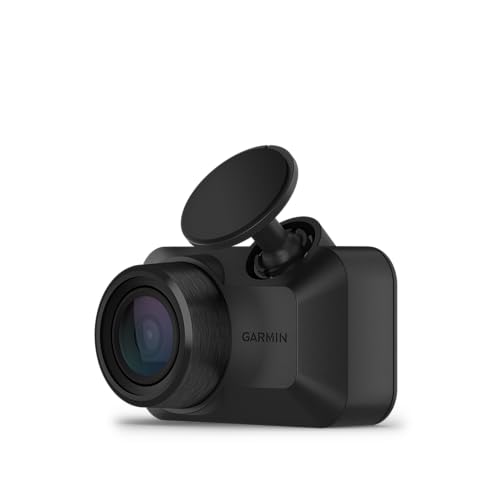
Garmin Dash Cam X210
Set up and replay clips on the camera itself, no app required.

VIOFO A119 Mini 2
Small enough to tuck behind the mirror, built for hot and frozen cabins.

Nextbase 322GW
Clicks off its powered mount when you park and back on when you drive.
How an Older Car Changes the Choice
A camera that suits a 2024 crossover can be a poor fit for a 2006 sedan. The differences are mostly about power and space, not picture quality.
- The power socket: many older cars have a round 12V lighter socket and no USB port. On some it switches off with the key; on others it stays live all the time, which keeps a plugged-in camera running.
- No OBD power option: OBD-II ports only became standard on US cars for the 1996 model year, so plug-in OBD power cables are out for anything earlier.
- A tired battery: an original-style flooded battery several winters old has less spare capacity for a camera drawing current overnight.
- Windshield space: a tint band, a small rear-view mirror mount or a steeply raked screen leaves less room, which favors a compact body.
None of this rules out a modern camera. It just means the install and the power source deserve more thought than the resolution figure on the box.
Screen on the Camera or Footage on Your Phone?
Many drivers of older cars want a camera they can set once and forget, without pairing a phone or installing an app. A unit with its own screen lets you aim the lens, change settings and replay a clip at the roadside. Three of the six picks below have one.
Screenless minis hide better behind the mirror and leave the view clear, but you use a Wi-Fi app to frame the shot and watch footage. That works well if you already live on your phone. It is a nuisance if you only check the camera after a fender bender.
Heat tolerance matters too. A car parked outside through a Grand Rapids summer, then left in single digits in January, is hard on lithium batteries, which is why some makers use a supercapacitor to hold the camera up long enough to close the last file.
Best Dash Cam for Older Cars: Six Plug-In Cameras Reviewed
All six are front cameras that run from a 12V socket adapter or a hardwire kit. Features come from each maker’s Amazon listing; check the listing for what is in the box, since memory cards are often extra.
1. Garmin Dash Cam X210: 1440p Compact Dash Cam with 2.4-Inch Display
- 1440p video with a 140-degree view
- 2.4-inch display for playback and settings
- Built-in Clarity polarizer to cut glare
- Voice control and GPS-stamped incident clips
The Garmin Dash Cam X210 is a compact front camera that records at 1440p, according to its listing title, through a 140-degree lens. Its 2.4-inch display is the main draw for an older car, because you can aim the lens, change settings and replay a saved clip without reaching for a phone. A built-in Clarity polarizer is meant to cut the windshield glare that washes out footage on bright days.
When it senses an incident, the camera saves the clip automatically and stamps it with GPS location, date and time. Voice commands let you save video or switch audio recording on and off with your hands on the wheel. Garmin also lists driver alerts such as forward collision and lane departure warnings, and its Drive app can show synced clips from up to four Garmin cameras if you add more later.
Some extras depend on a paid Vault subscription, a Wi-Fi connection and constant power, including live view and the parking guard notification. In an older car with a socket that stays live, that constant power is exactly what drains a tired battery, so many owners will run it as a plain driving recorder. It does not suit anyone who wants rear coverage straight out of the box.
View Garmin Dash Cam X210 on Amazon
2. VIOFO A119 Mini 2: 2K 60fps Front Dash Cam with STARVIS 2 Sensor and Supercapacitor
- 1440p at 60fps, up to 2592×1944 at 30fps
- Sony STARVIS 2 IMX675 sensor, F1.6 lens
- Supercapacitor rated 5°F to 149°F
- 5GHz Wi-Fi, GPS and voice control
The VIOFO A119 Mini 2 is a single-channel front camera, and the listing is clear that it does not support a rear camera. It records 2560×1440 at 60 frames per second, or up to 2592×1944 at 30, using a Sony STARVIS 2 IMX675 sensor behind a seven-element F1.6 lens. Turning on HDR drops the frame rate to 30 but helps balance dark roads against headlights and tunnel exits.
The feature that matters most for a car that lives outdoors is the supercapacitor, which VIOFO rates for operation from 5°F to 149°F. That range covers a dark sedan baking in a July lot and a frozen one on a January morning. The body is small enough to hide behind or beside the rear-view mirror, which helps on a narrow older windshield, and 5GHz Wi-Fi with the VIOFO app handles framing, playback and downloads.
There is no screen, so setup goes through your phone. Built-in GPS logs speed and route, and voice commands can lock a clip. Its three parking modes need the separately sold HK4 hardwire kit, and the microSD card is not included either. It suits an owner comfortable with apps who wants a discreet, weather-tolerant camera.
View VIOFO A119 Mini 2 on Amazon
3. Nextbase 322GW: 1080p Dash Cam with 2.5-Inch Touch Screen and Click&Go Powered Mount
- 1080p recording with a 140-degree lens
- 2.5-inch IPS touch screen
- Click&Go PRO powered magnetic mount
- Wi-Fi, Bluetooth 4.2, 10Hz GPS and Emergency SOS
The Nextbase 322GW records 1080p video through a 140-degree, six-lane-wide lens and shows footage on a 2.5-inch IPS touch screen. Its party trick is the Click&Go PRO mount. The power cable runs into the mount rather than the camera, and magnets link the two, so the camera clicks off in a second and back on when you return.
That suits an older car parked on the street, where a camera left on the glass can invite a broken window. Nextbase’s 322GW product page lists a car power cable in the box, so it runs straight from the lighter socket. The maker also lists 10Hz GPS, Wi-Fi and Bluetooth 4.2 for sending clips to the MyNextbase Connect app, plus an Intelligent Parking Mode that records when someone bumps the parked car.
Emergency SOS is designed to alert emergency services with your location after a crash and can share medical details you save in advance. Rear window, rear view and cabin modules are sold as add-ons, and a polarizing filter fits it too. It does not suit drivers who want the sharpest picture here, since 1080p trails the 1440p cameras on plate detail.
4. Rexing V1 Basic: 1080p Dash Cam with 2.4-Inch LCD and 170-Degree Lens

- Full HD 1080p at 30fps
- 2.4-inch LCD screen
- 170-degree wide-angle lens with F1.8 aperture
- G-sensor clip locking and loop recording
The Rexing V1 Basic is about as plain as a dash cam gets, and for many older car owners that is the point. It records Full HD 1080p at 30 frames per second, shows footage on a 2.4-inch LCD and uses a 170-degree lens, the widest field of view in this group. Rexing pairs an F1.8 aperture with WDR and HDR processing to keep night footage usable without extra lighting.
A built-in G-sensor detects a sudden jolt or collision and locks that clip so loop recording cannot overwrite it. Loop recording itself keeps the card filling and clearing without attention. The listing also describes a parking monitor that wakes the camera and records when it senses vibration, which again means thinking about power if the car’s socket stays live.
The low-profile body is designed to sit quietly behind the mirror, and Rexing backs it with an 18-month warranty and live phone support. Its listing does not mention Wi-Fi or GPS, so there is no speed stamp and no phone transfer; you move clips by card or on the screen. It suits a driver who wants a simple witness, not someone who expects app features or sharper than 1080p detail.
View Rexing V1 Basic on Amazon
5. Vantrue E1 Lite: 1080p Mini Dash Cam with 160-Degree Lens, GPS and Wi-Fi

- 1080p at 30fps with a 160-degree lens
- HDR and F1.8 aperture
- Built-in GPS speed and route logging
- Wi-Fi app with no subscription, voice control
The Vantrue E1 Lite is a compact front camera that records 1920×1080 at 30 frames per second through a 160-degree lens. Vantrue pairs HDR with an F1.8 aperture to keep plates and road markings readable in mixed light. The body is small and stealthy, which matters on an older windshield where a tint band or a small mirror mount leaves little room.
Built-in GPS records speed, location, route and direction, synced to satellite time, and you can review the log in the Vantrue app or on a computer. The app connects over Wi-Fi with no subscription and handles live view, settings and sharing. Voice commands can lock an emergency clip, take a photo or switch Wi-Fi without taking your hands off the wheel.
The listing notes that the E1 Lite does not support PD fast charging, so use the included car charger or Vantrue’s hardwire kit rather than a random USB adapter. Its 24-hour parking guard needs that hardwire kit, which is sold separately. With no screen, it does not suit drivers who want to replay clips on the camera itself rather than through a phone.
View Vantrue E1 Lite on Amazon
6. 70mai M310: 1296p Front Dash Cam with 130-Degree Lens and Wi-Fi App

- 2304×1296 video from a 3-megapixel camera
- 130-degree field of view
- WDR and 3D noise reduction
- Wi-Fi app, loop recording and G-sensor
The 70mai M310 is a straightforward front camera that records 2304×1296 from a 3-megapixel sensor, a step above standard 1080p. Its 130-degree field of view is the narrowest here, which keeps more detail on the lanes ahead at the cost of less coverage at the edges. WDR and a 3D noise reduction algorithm aim to steady exposure and clean up low-light footage.
A built-in G-sensor detects shakes or collisions and moves the clip into an Emergency Video folder so loop recording cannot overwrite it. The iOS and Android app connects over Wi-Fi for viewing and saving clips. It takes microSD cards from 16GB to 256GB at Class 10 or faster, and the card is not included.
Parking surveillance and time-lapse both need the 70mai UP03 hardwire kit, sold separately, so on a plain lighter socket it works as a driving recorder only, starting and stopping with the car. That suits an older commuter car well, because it stops drawing current when the socket goes dead. 70mai lists an 18-month warranty. It does not suit anyone who wants a screen, GPS logging or a rear camera.
The Six Side by Side
The table lines the cameras up on the points that matter most in an older car: picture, screen and what parking recording needs.
| Camera | Front video | Built-in screen | Parking recording |
|---|---|---|---|
| Garmin Dash Cam X210 | 1440p, 140 degrees | 2.4 inch | Alerts need constant power and a paid Vault plan |
| VIOFO A119 Mini 2 | 1440p at 60fps, 140 degrees | No | Three modes with the HK4 hardwire kit |
| Nextbase 322GW | 1080p, 140 degrees | 2.5 inch touch | Intelligent Parking Mode |
| Rexing V1 Basic | 1080p, 170 degrees | 2.4 inch | Vibration-triggered parking monitor |
| Vantrue E1 Lite | 1080p, 160 degrees | No | Needs the Vantrue hardwire kit |
| 70mai M310 | 1296p, 130 degrees | No | Needs the UP03 hardwire kit |
If you never leave the car on the street, skip parking recording entirely and keep the camera on a switched socket. That is the simplest and kindest setup for an older battery.

Powering a Camera Without Flattening an Aging Battery
Start with a two-minute test. Plug the camera into the socket, turn the key off, take the key out and wait. If the screen or status light stays on, that socket is always live, and the camera will keep drawing from the battery until you unplug it.
With a live socket you have three choices: unplug the adapter every time you park, use a socket with its own switch, or hardwire the camera to a fuse that only gets power with the ignition on. A hardwire kit with an adjustable low-voltage cutoff is the only sensible way to run parking mode in an older car. Set the cutoff on the high side through a Michigan winter, when a cold battery has less to give.

If the car has started going flat after a night or two, the camera may not be the only culprit. Our guide on why a car battery dies overnight walks through how to find a parasitic draw. Older fuse boxes can also be fussy about add-a-circuit taps, so if a tapped circuit pops repeatedly, read why a car fuse keeps blowing before fitting a larger fuse.
When a Shop Should Do the Wiring
Plugging into the lighter socket is a driveway job. Hardwiring an older car is different: brittle trim clips, aftermarket wiring from previous owners and fuse boxes with no labels left make it easy to tap the wrong circuit.

Before you buy, compare features across the whole range in our general dash cam buying guide. When you want the camera wired to a switched fuse, or a drain traced first, our car electrical repair in Grand Rapids covers fuse, wiring and battery faults on cars of any age.
More Buying Guides
Frequently Asked Questions
Can you put a dash cam in an older car?
Yes. Almost every dash cam can run from a 12V lighter socket adapter, so a car without USB ports is no obstacle. Check whether the adapter comes in the box, since some listings sell it separately.
Will a dash cam drain the battery in an old car?
Only if it keeps getting power with the engine off. On a switched socket it shuts down with the key. On an always-live socket, unplug it when you park or hardwire it with a low-voltage cutoff.
Do I need a hardwire kit for an older car?
Not for normal driving. A hardwire kit frees up the lighter socket and is needed for parking recording on most cameras. Use one with a voltage cutoff, and tap an ignition-switched fuse if you only want recording while driving.
Is the best dash cam for older cars one with a screen?
For many owners, yes. A screen lets you aim the lens and replay a clip without a phone app. If you prefer a hidden camera and already use apps, a screenless mini works just as well.
Not sure your older car’s socket or fuse box is up to a dash cam? Phone 456 AutoFix at 616-279-3832 between 8am and 5pm, Monday through Friday, or send us a note from the contact page to set up a time.
Driving the car all day during our hours? Bring it by after we close and leave it with the after-hours drop-off at our 456 Carrier St NE shop.