As an Amazon Associate, 456 AutoFix earns from qualifying purchases. Product links below go to Amazon, where you can confirm the right part for your vehicle.
Your iPhone already has a bright, sharp screen in your pocket, so a phone-connected inspection camera skips the cost and bulk of a built-in monitor. The catch is that the best borescope for iOS depends on your phone’s port, the maker’s app and the size of the gaps you want to see into, and plenty of listings blur all three.
Below we sort out the connection question first, then review six cameras whose Amazon listings name iPhone or iOS support. If you want a unit with its own screen instead, our borescope guide for car inspection covers those.
Quick answer
Which borescope works best with an iPhone?
Match the camera to your port. The DEPSTECH NTC55 ships with both USB-C and a Lightning adapter, so it covers old and new iPhones. The Klein Tools ET21 uses Wi-Fi and needs no port at all. For looking around corners on an iPhone 15 or later, the Teslong USB-C articulating scope steers its tip with a joystick.
Our Quick Picks
Three phone-connected cameras that cover the main iPhone setups: Lightning or USB-C, Wi-Fi, and a steerable tip.

DEPSTECH NTC55
Plugs into USB-C or, with the included adapter, Lightning iPhones.

Klein Tools ET21
Sends live video to your phone over Wi-Fi, so the iPhone's port never matters.

Teslong USB-C Articulating Borescope
Bends its camera head with a thumb joystick to look around corners.
How an Inspection Camera Talks to Your iPhone
There are three ways a scope gets its picture onto iOS. A wired USB-C camera plugs straight in, and Apple confirms that iPhone 15 and later models have a USB-C connector. Older iPhones use Lightning, so a wired camera needs a Lightning plug or an adapter the maker supplies. A Wi-Fi camera creates its own small network, and your phone joins it like any hotspot.
Each route has a trade-off. Wired units give a steady, low-lag image and draw power from the phone, which is handy until your battery is low on a cold driveway. Wi-Fi units carry their own battery and let you hold the phone away from the probe, but your phone drops its normal internet connection while it is joined to the camera.
Whatever the connection, the camera only works through its maker’s app from the App Store. Download it before you head out to look at a car, and check the listing for the minimum iOS version it supports.
What to Check Before You Order
- Port or Wi-Fi: a USB-C-only camera will not plug into an iPhone 14 or older, and listings like Teslong’s say so plainly.
- Probe diameter: roughly 8 mm or less fits most spark plug holes; a 5.5 mm tip slips into tighter gaps around wiring and brackets.
- Cable type: a semi-rigid cable holds the shape you bend it to, which matters when you push it along a frame rail or behind a bumper cover.
- Fixed or steerable tip: an articulating head lets you look back at a cylinder wall or the far side of a part without pulling the cable out.
- Lighting and lens layout: adjustable LEDs stop glare on shiny metal, and a side lens shows walls that a forward lens skims past.
Probe sizes and cable lengths in this guide come straight from each Amazon listing. Measure the opening you have in mind if you are unsure.
Best Borescope for iOS: Six Phone Cameras Reviewed
Every camera here lists iPhone or iOS support on Amazon. They are ordered from the most flexible connection to the more specialized designs, so read the compatibility line in each one against your own phone.
1. DEPSTECH NTC55: 2K Dual-Lens Phone Borescope with USB-C and Lightning
- 2560×1440 front and side lenses
- USB-C plug plus Lightning adapter
- 16.5 ft semi-rigid IP67 cable
- 8+1 adjustable LEDs
The DEPSTECH NTC55 is a wired phone endoscope that sorts out the port problem in the box. It has a Type-C connector and comes with a Lightning adapter, and the listing names support for iOS 11.0 and later. That means one camera can move between an older iPhone in your pocket and a newer USB-C model or iPad in the house.
The 7.9 mm probe carries two lenses, a forward camera and a side camera, and you switch between them in the DEPSTECHCAM app. DEPSTECH lists a 2560×1440 image, an 80 degree field of view and 8+1 LEDs you can dim or brighten. The app adds photo and video capture, 2x zoom and 90 degree rotation, and the maker says it needs no account and no internet connection.
The 16.5 ft semi-rigid cable is long enough to follow a frame rail or snake through a rocker panel, and the camera head and cable are rated IP67. A hook, a magnet and a threaded cap come with it for fishing out a dropped bolt. At 7.9 mm the tip is too thick for the tightest gaps, and it has no steerable head, so a cylinder wall view relies on the side lens.
2. Klein Tools ET21: WiFi Borescope with 5.5 mm Camera and 5-Foot Snake
- Wi-Fi link to the phone up to 30 ft
- 5.5 mm IP67 camera
- 5 ft high-flex snake
- Klein Tools ET21 app for iOS
The Klein Tools ET21 skips cables between camera and phone. It sends video and images over Wi-Fi to your smartphone, and Klein lists a range of up to 30 feet. Because nothing plugs into the phone, the ET21 does not care whether your iPhone has a Lightning or USB-C port, which makes it an easy pick for a household with a mix of devices.
The camera is 5.5 mm across, small enough for tight gaps around brackets, wiring and the narrower spark plug wells on some engines. Its 5-foot snake is described as high-flex while keeping enough stiffness to push along a pipe or into a cavity, and the camera is rated IP67. Adjustable LEDs light the view, and the free Klein Tools ET21 app for iOS and Android handles live view, saving and sharing.
Holding the phone away from the probe is useful when you are lying under a car or reaching deep into an engine bay. The short cable, though, will not travel the length of a frame rail the way a 16 ft scope can. As with any Wi-Fi camera, your phone leaves its normal network while it is joined to the ET21.
View Klein Tools ET21 on Amazon
3. Teslong USB-C Articulating Borescope: 180 Degree Joystick Tip with 5FT Cable
- Joystick-steered 180 degree probe
- USB-C for iPhone 15 and later
- 8 LEDs with 3 brightness levels
- 5 ft gooseneck and phone holder
This Teslong scope puts a steerable tip on a phone camera. A joystick under your thumb bends the probe through 180 degrees, so you can look back at the side of a part, around a bend or across a cylinder wall without pulling the cable out and reshaping it. The camera connects by USB-C, and Teslong lists it for the iPhone 15 and later plus Android.
It uses the free SmartEndoscope app, which the listing says needs no account or subscription. The 1.0MP camera records 1080P photos and video, and eight LEDs have three brightness settings for dark ducts or bright, reflective metal. A built-in phone holder keeps the screen in view, although Teslong notes that thick cases on large phones may need to come off.
The 5 ft semi-rigid gooseneck holds a bend, which helps when you aim the tip into an engine bay from above. That length is short for underbody rust checks along a full frame rail. It will not connect to a Lightning iPhone, so owners of an iPhone 14 or older should look at the DEPSTECH or a Wi-Fi model instead.
View Teslong USB-C Articulating Borescope on Amazon
4. Teslong 10FT USB-C Endoscope: Plug-and-Play Camera for iPhone 15 and Later

- USB-C plug-and-play connection
- 8 high-brightness LEDs
- 10 ft semi-rigid IP67 cable
- 1.0MP camera with white balance
The Teslong 10FT is the simplest camera here: plug it into a USB-C iPhone or iPad, open the app and look. There is no Wi-Fi pairing and no separate battery to charge. Teslong lists compatibility with the iPhone 15, 16 and 17 series, USB-C iPads and Android phones with OTG, and it states clearly that older Lightning iPhones, Windows PCs and MacBooks are not supported.
Eight high-brightness LEDs and built-in white balance light the scene without manual adjustment, and the camera is rated 1.0MP. The 10 ft semi-rigid cable keeps a bend you put in it, so you can hook it over a crossmember or feed it into a door cavity, and the cable and head carry an IP67 rating against dust and water.
That mix suits quick looks: a leak on the back of an engine, a rattle behind a heat shield or rust inside a rocker. It has one forward lens and no steerable tip, so you will see less of a cylinder wall than with a side or articulating camera. Because it draws power from the phone, a long session will take a bite out of your battery.
View Teslong 10FT USB-C Endoscope on Amazon

5. BlueFire 5.5mm Wireless Endoscope: 1080P WiFi Camera with 1800mAh Battery
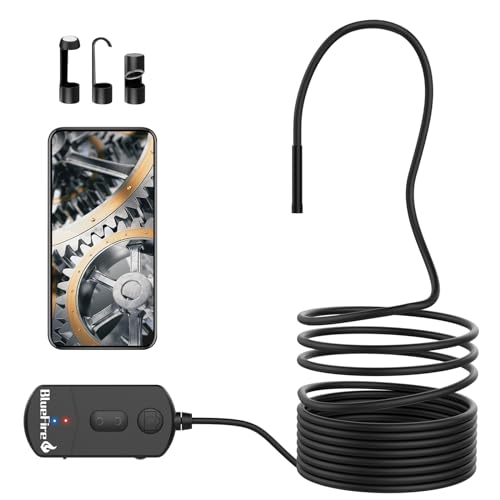
- Wi-Fi link to iOS 9.0+ devices
- 5.5 mm 1080P camera
- 11.5 ft semi-rigid cable
- 1800mAh battery, 3-4 hours listed
The BlueFire wireless endoscope streams to your phone through a small Wi-Fi box that carries its own 1800mAh battery. BlueFire lists three to four hours of working time, and because it never draws on the phone, your iPhone keeps its charge for photos and calls. The listing names support for iOS 9.0 and later, so it works with Lightning and USB-C models alike.
The camera is 5.5 mm across and records at up to 1920×1080, with 1280×720 and 640×480 settings as well. Plus and minus buttons zoom the picture in three steps, and six LEDs light the view. The 11.5 ft semi-rigid cable is long enough to reach under a car from the side and follow a rail for a good distance.
BlueFire rates the camera and cable IP68, but it says the Wi-Fi box itself is not waterproof and suggests keeping underwater use under ten minutes. It is not compatible with Windows PCs or Macs. Like every Wi-Fi scope, it takes over your phone’s wireless connection while you use it, so you cannot browse a listing at the same time.
View BlueFire 5.5mm Wireless Endoscope on Amazon
6. Ralcam Two-Way Articulating Borescope: 180 Degree Tip with Phone and Monitor View

- Two-way 180 degree steering lens
- Works with iPhone app and its own monitor
- 0.33 in probe on a 3.3 ft cable
- Built-in rechargeable battery
The Ralcam combines a handheld unit with phone viewing. Its two-way tip bends through 180 degrees, and the listing says the picture shows on the unit’s own monitor and on a connected phone at the same time. You download the app from the App Store, connect the phone by USB cable and turn the camera on, so it suits a car owner who shares the tool with someone using a different phone.
The lens is 0.33 in across, and the camera captures 1920×1080 video and photos lit by six adjustable LEDs. A built-in lithium-ion battery powers the unit. Ralcam also describes a heat protection feature that shuts the probe down when the temperature passes 90 degrees, which is a reminder to let an engine cool before you look inside.
The 3.3 ft flexible cable is the shortest here, so this is an engine bay and wheel well camera rather than a full underbody tool. The probe is IP67 rated but the handheld body is not waterproof. Its 0.33 in tip is also wider than the 5.5 mm cameras above, so measure smaller openings before relying on it.
View Ralcam Two-Way Articulating Borescope on Amazon
Picking by Phone and Job
Finding the best borescope for iOS gets easier in two steps: first the phone in your hand, then the job you plan to do with the camera. This table pairs the two.
| Your phone | Main job | Camera to look at |
|---|---|---|
| Lightning iPhone (14 or older) | General engine bay and body checks | DEPSTECH NTC55 with its adapter |
| Any iPhone or iPad | Cordless use, phone held away from the probe | Klein Tools ET21, BlueFire 5.5mm |
| iPhone 15 or later | Seeing around corners and back at walls | Teslong USB-C articulating |
| iPhone 15 or later | Quick plug-in checks with no pairing | Teslong 10FT USB-C |
The Ralcam sits outside the table because it carries its own monitor as well as working with a phone. That suits someone who shares the camera with a person whose phone is a different make.
Using a Phone Borescope on a Used Car in West Michigan
The best borescope for iOS earns its place when you go to see a car for sale. Years of road salt work on the inside of rocker panels, the backs of frame rails and the pinch welds under the doors, places a flashlight cannot reach. Feed the probe through a drain hole or a gap in the trim and you can see whether the metal is solid or flaking, then save a photo to show someone later.
Under the hood, look for wet oil around the valve cover and the back of the engine, and with the seller’s permission and the engine cold, view the cylinders through a spark plug hole. Our list of the tools for a used car inspection covers the scanner, gauge and light that go in the same bag.
Cold weather matters too. Phone batteries drain faster in a Michigan winter, so a wired camera can flatten a half-charged iPhone during a long look. Charge both the phone and any Wi-Fi camera before you leave, and keep the cable warm in a pocket so the semi-rigid sheath stays easy to bend.
When the Pictures Need a Second Opinion
A camera shows you what is there, but reading it takes practice. Light scoring on a cylinder wall, carbon on a piston top or a damp patch on a rail can be normal or a warning, depending on mileage and how the car was kept. If you are about to spend real money, read what a pre-purchase inspection includes before you decide.
Our Creston shop works on foreign and domestic vehicles and offers a pre-purchase inspection in Grand Rapids. Bring your own borescope photos along and we can talk through what they show.
More Buying Guides
Frequently Asked Questions
Will a USB-C borescope work with my older iPhone?
Not directly. iPhones before the iPhone 15 use a Lightning port, and some USB-C cameras, such as the Teslong 10FT, state that they do not support Lightning models. Choose a camera that includes a Lightning adapter or one that connects over Wi-Fi.
Do I need an account or subscription for the borescope app?
Not for the cameras in this guide, according to their listings. Teslong’s SmartEndoscope app and the DEPSTECHCAM app both run without an account, and DEPSTECH says its app works without an internet connection.
Is a Wi-Fi or wired borescope better for an iPhone?
Wired cameras give a steady picture and need no pairing, but they use your phone’s battery. Wi-Fi cameras work with any iPhone port and run on their own battery, though your phone leaves its normal network while connected.
Can I look inside an engine cylinder with an iPhone borescope?
Yes, if the probe fits the spark plug hole and the engine is cold. Remove the plug, feed the tip in gently and turn the crank by hand only if you know the procedure. A steerable tip makes it easier to see the cylinder walls.
Found something odd on the camera and want a professional look before you buy? Ring 456 AutoFix at 616-279-3832 between 8am and 5pm, Monday to Friday, or arrange a pre-purchase inspection on our contact page.
Working hours don’t suit the seller? Our after-hours drop-off is available, and the address for it is 456 Carrier St NE, Grand Rapids, MI 49505.